Consumers receiving an unexpected Robinhood scam text or security alert are often trying to determine whether someone is actually accessing their brokerage or crypto account.
Fake Robinhood messages may warn about an unauthorized login, suspicious withdrawal, crypto transfer, account restriction, or security problem and then tell you to click a link or call a support number.
Robinhood is a legitimate financial-services company, but criminals impersonate Robinhood to steal account credentials, verification codes, money, cryptocurrency, and personal information.
One particularly useful rule comes directly from Robinhood: Robinhood Support says it will never send you links within text messages.
Quick Verdict
Do not use the contact information in the message. Open the Robinhood app or type Robinhood.com directly into your browser and check the account independently.
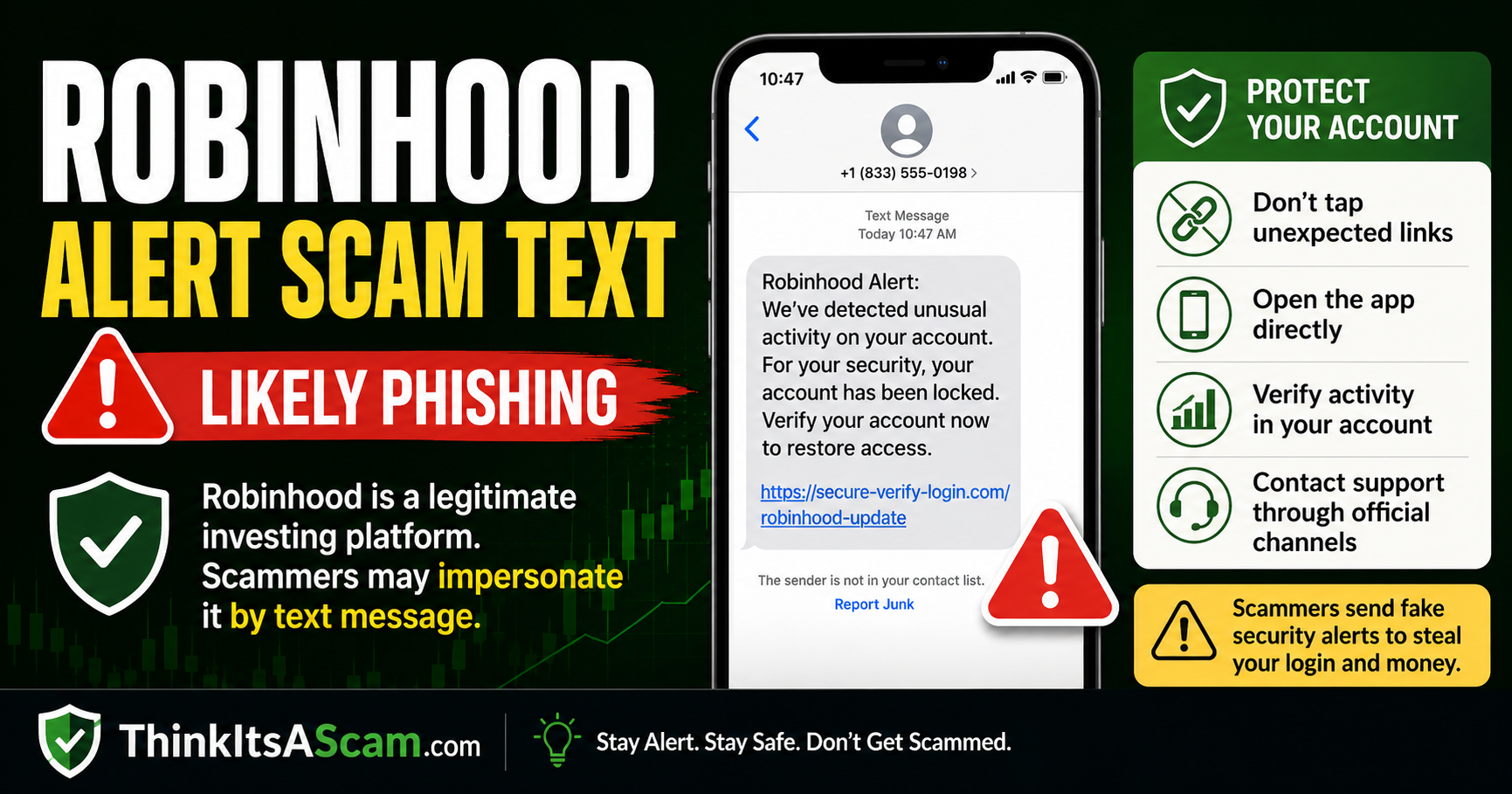
Fake Robinhood alerts may warn about suspicious activity, withdrawals, or account restrictions. Robinhood says its support team will not send links in text messages or ask for your password, 2FA code, or wallet recovery phrase.
What Does a Robinhood Scam Text Look Like?
Common versions claim:
- Your Robinhood account has been locked.
- A suspicious login was detected.
- An unauthorized withdrawal is pending.
- A crypto transfer needs approval.
- Your account has been restricted.
- Your identity must be verified.
- A new device accessed your account.
- You must call immediately to stop a transaction.
The message may use Robinhood’s name and branding and may even contain information about you.
That does not prove the sender is Robinhood.
Robinhood Says Support Will Not Send Links in Text Messages
This is one of the clearest ways to evaluate a suspicious Robinhood text.
Robinhood’s current scam guidance states that Robinhood Support will never send links within text messages.
Robinhood also says its support representatives will never:
- Ask for your Robinhood password
- Ask for your 2FA code
- Ask for a Robinhood Wallet secret recovery phrase
- Ask you to download remote-access software
- Ask you to share your screen
- Ask for credentials to another trading platform
- Tell you to send money through another payment app
- Tell you to transfer cryptocurrency to protect your account
If a text using the Robinhood name does any of those things, stop communicating with the sender.
Can Robinhood Send Legitimate Text Messages?
Yes. Not every Robinhood-related SMS message is automatically fraudulent.
Robinhood uses verification methods that can include an SMS one-time code when a legitimate account login or identity-verification process is taking place.
The important distinction is that a legitimate verification code should only be used for an action you initiated yourself.
If you suddenly receive a Robinhood verification code when you were not logging in or changing your account:
- Do not share the code.
- Do not reply to the message.
- Do not call anyone who contacts you asking for it.
- Open Robinhood directly and check your account.
An unexpected code could indicate that someone is attempting to access your account.
Fake Robinhood Support Number Scam
Some phishing messages do not include a website link.
Instead, they provide a telephone number and tell you to call immediately.
The number may supposedly connect you with:
- Robinhood Security
- Robinhood Fraud Department
- Robinhood Customer Support
- Robinhood Crypto Support
- An account-protection specialist
The person answering is actually an impostor.
Robinhood specifically warns users not to search the internet for Robinhood support phone numbers because fraudulent support numbers can appear in search results.
Robinhood says phone support should be requested through the Robinhood app or through Robinhood.com/contact.
How the Robinhood Text Scam Works
- You receive an alarming text, email, or phone call.
- The sender claims something is wrong with your Robinhood account.
- You are told to click a link or contact a supposed support department.
- A fake site or support agent asks for credentials or security information.
- The scammer attempts to access your brokerage, crypto, email, or bank account.
- The scammer may attempt to withdraw money, transfer crypto, change security settings, or lock you out.
Why Brokerage Accounts Are Being Targeted
Brokerage-account takeover has become a significant cybersecurity concern.
In April 2026, FINRA reported a notable increase in brokerage customer account takeovers.
FINRA says criminals may obtain access through tactics including:
- Phishing emails
- SMS phishing or “smishing”
- Stolen usernames and passwords
- Stolen multi-factor authentication codes
- Malicious software
- Other social-engineering attacks
An investment account can be particularly attractive because an attacker may gain access to securities, cash, linked bank information, or cryptocurrency.
The Fake Fraud-Department Trick
A scammer may claim they are contacting you because Robinhood detected fraud.
The caller then offers to help “protect” your investments.
You may be instructed to:
- Transfer securities
- Sell investments
- Send cryptocurrency
- Move cash to another account
- Provide a verification code
- Add unfamiliar account information
Do not move money or crypto because an unsolicited caller says it is necessary to protect your funds.
The FTC warns that fraudsters frequently impersonate financial institutions and convince victims to transfer money supposedly to keep it safe.
Never Share a Robinhood Verification Code
A one-time code helps prove that the person attempting to sign in is really the account owner.
If you give the code to a scammer, you may effectively help that person complete the login or security change.
Robinhood explicitly states that its representatives will not ask for your 2FA code.
The FTC gives similar advice for financial accounts: never share a verification code with someone who contacts you unexpectedly.
Robinhood Crypto Transfer Scam
Crypto can make these impersonation scams especially dangerous.
A fake support representative might claim that you must:
- Move crypto to a “safe wallet”
- Transfer assets to verify ownership
- Send crypto to reverse a suspicious withdrawal
- Connect a wallet to secure your account
- Import a recovery phrase
Robinhood says its representatives will not ask users to send money or cryptocurrency to protect an account.
Robinhood also warns that crypto transfers generally cannot be reversed after they are completed.
Never Share a Wallet Recovery Phrase
If you use Robinhood Wallet, protect your secret recovery phrase.
The recovery phrase can provide control over wallet assets.
Robinhood states that it will never ask you to provide your secret recovery phrase outside the Robinhood Wallet app.
Do not:
- Read the recovery phrase to a caller
- Send it through text or email
- Enter it into a website opened from an unsolicited message
- Import a recovery phrase supplied by someone else
Warning Signs of a Fake Robinhood Alert
The Text Contains a Link
Robinhood says its support team does not send links through text messages.
You Are Told to Call a Number
Do not use a support number from an unexpected message. Request Robinhood support through the app or official website.
You Are Asked for a 2FA Code
Robinhood representatives should not request your two-factor authentication code.
You Are Asked for Your Password
Never provide your Robinhood password to someone contacting you.
You Are Told to Move Your Money
An instruction to transfer cash, securities, or crypto to “protect” the account is a major warning sign.
You Are Asked to Install Software
Robinhood says support will not ask you to download remote-desktop software or share control of your screen.
The Message Uses Extreme Urgency
Phrases such as “account will be suspended,” “withdrawal processing now,” or “respond immediately” are intended to make you act before independently checking the account.
What About a Robinhood Scam Email?
Scammers also use email.
A fake Robinhood email may claim:
- Your account is restricted.
- Your identity verification failed.
- A withdrawal is pending.
- Your tax documents are ready.
- An unfamiliar device logged in.
- You need to update your information.
Robinhood says authentic company email normally uses approved Robinhood domains, including @robinhood.com, although certain shareholder-related communications can come through other authorized services.
Do not treat the displayed sender name as proof.
Rather than clicking a button inside an unexpected email, access Robinhood independently.
What If You Receive an Unexpected Login Approval?
If Robinhood asks you to approve a device or login that you did not initiate, do not approve it.
Open the app independently and review:
- Known devices
- Recent account activity
- Security settings
- Contact information
Remove devices you do not recognize.
What to Do If You Receive a Robinhood Scam Text
- Do not click any link.
- Do not reply.
- Do not call a number in the message.
- Do not share a verification code.
- Open the Robinhood app yourself.
- Review recent activity and devices.
- Use the app or Robinhood.com/contact if you need support.
- Report the phishing attempt.
- Delete the scam message.
How to Report Robinhood Phishing
Robinhood currently asks users to send suspected phishing involving emails, texts, phone calls, websites, social media, or Robinhood Wallet to:
reportphishing@robinhood.com
For a suspicious text, Robinhood recommends including a screenshot and the number that contacted you.
You can also forward scam text messages to 7726 (SPAM) for your wireless carrier.
Suspicious scams can also be reported to the Federal Trade Commission at ReportFraud.ftc.gov.
What If You Clicked the Link?
If you opened a suspicious link but did not provide information, close the site and do not interact further.
If you entered your Robinhood credentials:
- Open the official Robinhood app or website from a trusted device.
- Change your password immediately.
- Use a strong password that is not used on other accounts.
- Review and remove unfamiliar devices.
- Secure the email account connected to Robinhood.
- Review recent trades, withdrawals, transfers, and security changes.
- Contact Robinhood Support immediately.
How to Freeze a Compromised Robinhood Account
Robinhood provides an account-freeze option for customers who believe their account has been hacked or has unauthorized activity.
Robinhood instructs users who still have access to their account to contact support through the app and report that the account is hacked or has unauthorized activity.
Follow the current in-app instructions to freeze the account if that option is presented.
A freeze can restrict new deposits, withdrawals, and new positions while the account is reviewed.
What If You Lost Access to Robinhood?
Robinhood’s current security guidance says users who cannot access their account can seek help through:
support@robinhood.com
Do not use a telephone number supplied by the person who contacted you.
What If You Shared a Verification Code?
Treat this as urgent.
The code may have allowed someone to:
- Sign into the account
- Approve a new device
- Change account information
- Authorize another sensitive action
Immediately secure the Robinhood account and the associated email account, change passwords, review devices and transactions, and contact Robinhood through its official support channel.
What If Money or Crypto Was Taken?
Act quickly.
- Contact Robinhood through the app or official website.
- Freeze the account if appropriate.
- Contact your bank if a linked bank account was affected.
- Preserve screenshots and transaction details.
- Preserve wallet addresses and transaction IDs involving crypto.
- File a report with the FBI Internet Crime Complaint Center if appropriate.
- Report the scam to the FTC.
Cryptocurrency transfers can be extremely difficult or impossible to reverse once completed.
Will Robinhood Reimburse Scam Losses?
Robinhood publishes a Security Guarantee that may reimburse eligible direct losses resulting from certain unauthorized account activity.
However, the guarantee has conditions.
Robinhood states that reimbursement may not apply when a customer:
- Shares login credentials
- Fails to adequately safeguard account information
- Authorizes another person to transact
- Personally sends money or crypto as part of a scam
Do not assume that a financial institution will automatically reimburse a payment or crypto transfer you personally authorized after being deceived.
Report unauthorized or suspicious activity immediately and allow Robinhood to investigate the specific circumstances.
Protect Your Email Account Too
The email account connected with a brokerage account can be just as important as the brokerage password.
A compromised email account can potentially allow criminals to:
- Intercept security notices
- Request password resets
- Hide alerts
- Impersonate you
Use a unique password and multi-factor authentication on your email account as well.
Watch for SIM-Swap Fraud
Robinhood also advises customers to secure their mobile-carrier account.
In a SIM-swap attack, a criminal takes control of a victim’s phone number and may then receive SMS security codes intended for that victim.
Use your mobile carrier’s available account-security protections and contact the carrier immediately if your phone unexpectedly loses service and you suspect unauthorized changes.
Official Robinhood and Consumer Resources
- Robinhood – How to Identify and Report Scams
- Robinhood Security Best Practices
- Official Robinhood Contact
- FINRA Investor Fraud and Security Guidance
- FTC Phishing Guidance
- ReportFraud.ftc.gov
- FBI Internet Crime Complaint Center
Related Think It’s a Scam Articles
- Betterment Scam or Legit? Security & Account Warning
- Visa Click to Pay Scam? Unexpected OTP, Email & Text Warning
- Meta Verified Message Scam: Fake Account Warning
Frequently Asked Questions
Is a Robinhood security text a scam?
An unexpected text containing a link, callback number, or request for account credentials should be treated as suspicious. Robinhood specifically says its support team will not send links in text messages.
Does Robinhood send text messages?
Robinhood may use SMS one-time codes during legitimate identity verification or login processes. Do not share a code with anyone, and investigate an unexpected code that arrives when you were not trying to access your account.
Does Robinhood text links?
Robinhood’s current scam guidance states that Robinhood Support will never send links within text messages.
Will Robinhood call me?
Robinhood offers phone support through a callback requested through the app or Robinhood.com/contact. Do not trust an unsolicited phone number found in a text message or online search result.
Will Robinhood ask for my 2FA code?
No. Robinhood states that its representatives will never ask for your two-factor authentication code.
Will Robinhood ask for my password?
No. Robinhood Support says it will not ask for your Robinhood password.
Will Robinhood ask me to move crypto to protect my account?
No. Robinhood warns that its support representatives will not ask users to send money or cryptocurrency to supposedly protect an account.
Does Robinhood ask for wallet recovery phrases?
Robinhood says it will not ask for a Robinhood Wallet secret recovery phrase outside the Wallet app. Never provide the recovery phrase to a caller, texter, social-media account or unfamiliar website.
What if I got a Robinhood verification code I did not request?
Do not share or use the code. Open Robinhood independently, review your account security and devices, and contact official support if you see suspicious activity.
How do I report a fake Robinhood text?
Robinhood currently accepts phishing reports at reportphishing@robinhood.com. You can also forward unwanted scam texts to 7726 and report fraud to the FTC.
Can someone take over my brokerage account through a phishing text?
Yes. FINRA warns that brokerage account takeovers can begin with phishing emails or SMS smishing that steals passwords, account details or multi-factor authentication codes.
Have You Received a Robinhood Scam Text?
If you received a suspicious Robinhood security alert, share the non-sensitive details below.
- What did the message claim happened?
- Did it mention a login, withdrawal, transfer, crypto or account restriction?
- Did the message contain a link?
- Did it provide a callback number?
- Were you asked for a verification code?
- Were you told to transfer money or crypto?
- Did your real Robinhood account show matching activity?
- Were you able to secure the account?
Please do not post your phone number, email address, Robinhood username, password, account number, verification code, wallet address linked to your identity, secret recovery phrase, bank information, transaction credentials or other sensitive information in the comments.
Page researched and reviewed: September 18, 2026.
Disclaimer
ThinkItsAScam.com is an independent consumer-information website and is not affiliated with Robinhood Markets, Robinhood Financial, Robinhood Crypto, FINRA, the Federal Trade Commission or any organization mentioned in this article.
This article discusses phishing, impersonation, account takeover and crypto scams that may misuse the Robinhood name. It does not allege that Robinhood itself operates these scams. Support procedures, security features and fraud tactics can change. This article is for general consumer education and is not investment, legal, financial or cybersecurity advice.
Leave a Reply