Microsoft Security Alert Scam messages may appear as full-screen browser pop-ups, emails, text messages, or unsolicited phone calls claiming that your computer or Microsoft account has been hacked, infected, locked, or compromised.
A fake alert usually creates panic and tells you to call a supposed Microsoft support number, click a security link, install remote-access software, or pay for immediate computer repairs.
A browser warning that displays a telephone number and tells you to call Microsoft is a scam warning sign. Microsoft states that its genuine error and warning messages do not include phone numbers.
However, Microsoft can send legitimate account-security emails and texts about unusual sign-ins or account changes. The important question is whether the message is a fake tech-support alert or a real account notification that can be verified independently.
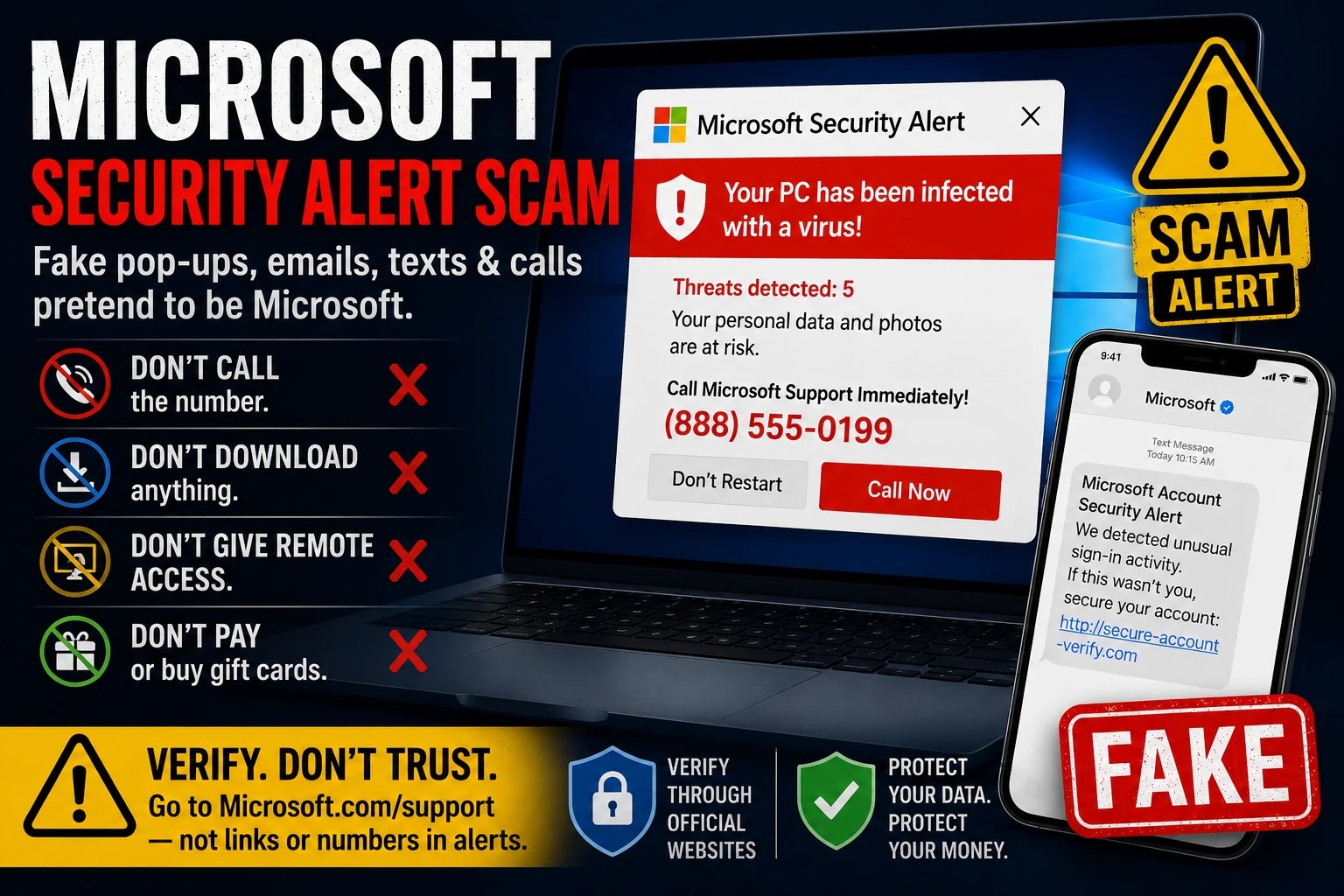
Microsoft Security Alert: Scam or Legit?
- Browser pop-up with a support number: Treat it as a scam.
- Unsolicited Microsoft support call: Hang up.
- Request for remote access: Do not allow it.
- Request for gift cards, cryptocurrency, or a money transfer: It is a scam.
- Email or text about an unusual sign-in: It may be legitimate, but verify it by opening your Microsoft account independently.
Quick Verdict
Likely Scam if the alert tells you to call a telephone number, download support software, give someone remote access, disclose a security code, or pay to unlock or repair your computer.
Microsoft does not make unsolicited calls offering technical support. Microsoft also says its genuine error and warning messages do not include phone numbers.
Do not call the number shown in an unexpected pop-up, email, text, or search advertisement. Close the message and access Microsoft Support through an official Microsoft website that you open yourself.
What Is the Microsoft Security Alert Scam?
The Microsoft Security Alert Scam is a tech-support and business-impersonation scheme that misuses Microsoft, Windows, Microsoft Defender, Windows Security, Outlook, or Microsoft account branding.
The alert may claim:
- Your computer has been infected with a virus or Trojan.
- Your personal or financial information is being stolen.
- Your Microsoft account has been compromised.
- Your computer has been locked for security reasons.
- Windows Defender detected spyware.
- Your IP address has been used for illegal activity.
- Your Microsoft account will be suspended.
- You must call Microsoft Support immediately.
The goal is usually to make you contact the scammer before you have time to verify whether anything is actually wrong.
Microsoft Security Alert Scam Versus a Legitimate Microsoft Alert
How to tell the difference:
A fake tech-support alert commonly appears inside a browser, provides a telephone number, says your computer is locked, and pressures you to call immediately.
A legitimate Microsoft account alert may notify you about an unusual sign-in, password change, security-code request, or other account activity. Microsoft may send these alerts through email or text.
Even when an account alert looks legitimate, the safest response is to open a new browser tab, enter Microsoft’s official website yourself, sign in, and review recent activity without using the message’s link.
How the Microsoft Security Alert Scam Works
A typical Microsoft security warning scam follows these steps:
- You encounter a pop-up, email, text message, search result, or unsolicited call.
- The message claims your computer or Microsoft account is in immediate danger.
- You are told to call a support number or click a security link.
- A scammer answers while pretending to represent Microsoft, Windows, or Microsoft Defender.
- The scammer asks you to install remote-access or screen-sharing software.
- The scammer claims to find viruses, hackers, account breaches, or other serious problems.
- You are pressured to pay for unnecessary support, software, subscriptions, or security services.
- The scammer may also attempt to steal passwords, verification codes, card details, banking information, or files.
Some scams continue into a fake refund scheme. The caller may claim that too much money was refunded and demand that you return the supposed excess through gift cards, cryptocurrency, a wire transfer, cash, or a payment app.
Common Microsoft Security Alert Scam Messages
Fake alerts may use wording such as:
- Microsoft Security Alert.
- Windows Defender Security Warning.
- Your computer has been locked.
- Virus detected on your computer.
- Trojan spyware alert.
- Your Microsoft account has been compromised.
- Access to this PC has been blocked for security reasons.
- Do not shut down or restart your computer.
- Call Windows Support immediately.
- Your personal information is being stolen.
- Microsoft fraud alert.
- Suspicious activity detected.
The wording, telephone number, error code, claimed virus, and payment demand can change. The instruction to call an unfamiliar support number is the central warning sign.
Microsoft Security Warning Pop-Up Scam
A Microsoft security warning pop-up scam may fill the entire browser window and imitate Windows Security, Microsoft Defender, a blue-screen error, or a system notification.
The page may play an alarm, repeat a recorded warning, disable ordinary browser buttons, open multiple dialog boxes, or tell you not to close the window.
The browser may appear locked, but the page generally does not prove that Microsoft has locked the computer or that the claimed virus exists.
Microsoft specifically warns that its genuine error and warning messages do not include telephone numbers. Therefore, a browser alert telling you to call Microsoft, Windows Support, or Microsoft Defender should not be trusted.
Windows Defender Security Warning Scam
Some pop-ups use the name Windows Defender or Microsoft Defender to make the warning appear official.
The fake page may claim that Defender found:
- Trojan spyware.
- Password-stealing malware.
- Financial-information theft.
- Unauthorized account access.
- A blocked Microsoft license.
- A compromised IP address.
Microsoft Defender is a legitimate Microsoft security product. The scam involves an unauthorized website, caller, email sender, or advertiser misusing its name.
Open the actual Windows Security application from the Windows Start menu if you want to review device-security information. Do not use the telephone number or software download shown in a browser warning.
Microsoft Security Alert Email: Is It Legitimate?
Not every Microsoft security alert email is fraudulent.
Microsoft may send legitimate notifications about:
- An unusual sign-in attempt.
- A sign-in from a new device or location.
- A password change.
- A security-code request.
- Updated recovery information.
- Other changes to a Microsoft account.
Microsoft identifies @accountprotection.microsoft.com as a legitimate domain used for Microsoft account notifications. One sender Microsoft identifies is:
account-security-noreply@accountprotection.microsoft.com
Do not judge the message only by the displayed sender name or Microsoft logo. Scammers may use similar-looking addresses, altered spellings, unrelated domains, or a misleading display name.
The safest verification method is:
- Do not use the email’s link.
- Open a new browser window.
- Type Microsoft’s official account address yourself.
- Sign in to the account.
- Review recent sign-in and security activity.
- Secure the account if you see activity you did not authorize.
Microsoft Account Security Alert Email
A legitimate Microsoft account security alert email may say that unusual activity was detected.
This does not necessarily mean that an attacker successfully accessed the account. An alert may be triggered by:
- Signing in from a new computer or phone.
- Traveling to a different location.
- Using a new browser or application.
- Entering an incorrect password repeatedly.
- An unauthorized person attempting to sign in.
Review the account’s recent activity directly. If you see a sign-in you do not recognize, change the password, review recovery information, and secure the account.
Microsoft Security Alert Text Message
Microsoft can send legitimate security codes and account-activity alerts by text message.
Microsoft currently says some genuine texts may come from 69525 or display Microsoft as the sender.
However, receiving a code or Microsoft-branded message does not mean you should give that code to another person.
If you did not initiate a sign-in or account change:
- Do not share the code.
- Do not reply to an unfamiliar caller.
- Do not approve an authentication request.
- Review your Microsoft account activity independently.
- Change your password if unauthorized activity appears.
A one-time verification code is intended for you to enter during an action you initiated. A caller requesting that code may be trying to access your account.
Microsoft Scam Phone Call
An unsolicited caller may claim to be:
- Microsoft Support.
- Windows Technical Support.
- Microsoft Security.
- Microsoft Defender Support.
- The Microsoft fraud department.
- A Microsoft account-security representative.
The caller may say that Microsoft received error reports from your computer or detected hackers using your internet connection.
Microsoft says it does not make unsolicited calls offering technical support. Hang up if someone unexpectedly calls and claims that Microsoft detected a problem with your computer.
Caller ID is not proof that the call came from Microsoft. Scammers may spoof company names, local numbers, or toll-free telephone numbers.
Warning Signs of a Microsoft Security Alert Scam
The Alert Includes a Telephone Number
Microsoft says genuine error and warning messages do not include phone numbers.
The Caller Contacted You Unexpectedly
Microsoft does not make unsolicited calls offering to repair a computer or remove a virus.
The Alert Says Your Computer Is Locked
A browser page may imitate a locked computer by entering full-screen mode or repeatedly displaying dialog boxes.
You Are Told Not to Close the Window
This instruction is intended to keep you frightened and prevent you from seeking independent help.
The Caller Requests Remote Access
Remote access could allow the caller to view files, observe account activity, install software, or manipulate what appears on the screen.
The Caller Requests a Verification Code
Do not give an unexpected caller a Microsoft, email, banking, or payment security code.
The Caller Wants Gift Cards or Cryptocurrency
Gift-card payments, cryptocurrency transfers, wire transfers, and transfers to supposed protected accounts are major scam indicators.
The Caller Claims to Have Issued Too Large a Refund
A fake refund scam may pressure you to return money that was never actually deposited.
The Message Uses Threats or Urgency
Scammers may say your files will be deleted, the computer will stop working, your Microsoft account will close, or police will be contacted unless you act immediately.
How to Close a Fake Microsoft Security Pop-Up
Do not click buttons inside the warning, including buttons labeled Scan, Protect, Allow, Remove Virus, Contact Support, or Close.
Instead:
- Do not call the displayed number.
- Press Esc to leave full-screen mode when possible.
- Try Alt + F4 on Windows to close the browser window.
- If the window will not close, press Ctrl + Shift + Esc to open Task Manager.
- Select the browser and choose End task.
- On a Mac, use Command + Option + Esc, select the browser, and choose Force Quit.
- Reopen the browser without restoring the suspicious tabs.
- Clear the affected site’s browser data if the page returns.
- Run a scan using Windows Security or another trusted security product.
Simply seeing the browser pop-up does not necessarily mean that remote access occurred or that malware was installed. The risk becomes greater if you clicked a download, installed software, entered account information, or allowed another person to control the device.
What Is the Real Microsoft Support Number?
Do not use a support number displayed in a pop-up, unexpected email, text, social-media post, or search advertisement.
Microsoft provides different support routes depending on the product, account type, and country. It does not use one universal telephone number for every Microsoft, Windows, Outlook, Microsoft 365, Surface, or Xbox problem.
Start through Microsoft’s official Contact Support system or use a Microsoft-published regional telephone directory.
For an independent overview of Microsoft’s current account-recovery and support options, see Microsoft Customer Service, Account Recovery and Support.
What If You Already Called the Number?
If you called but did not provide information, install software, or send money:
- End the call.
- Block the number.
- Do not answer follow-up calls.
- Monitor your Microsoft, email, and financial accounts.
- Report the scam attempt.
Be cautious of follow-up callers who claim to be fraud investigators, bank employees, government agents, or Microsoft supervisors. The same scam operation may contact you again under a different identity.
What If You Allowed Remote Access?
If the caller controlled your computer or persuaded you to install remote-access software, act quickly:
- Disconnect the computer from the internet.
- End the remote-access or screen-sharing session.
- Do not access banking or other sensitive accounts from that device.
- Remove the remote-access software.
- Run a complete security scan.
- From another trusted device, change your Microsoft, email, banking, and other important passwords.
- Enable multi-factor authentication where available.
- Review Microsoft account activity and recovery information.
- Contact your bank if financial accounts were visible or accessed.
- Consider professional technical assistance if you are uncertain whether the computer is secure.
Tell your bank that a scammer may have had remote access to the device. This information may affect how the institution secures and monitors your accounts.
What If You Paid the Scammer?
Contact the payment provider immediately.
- Credit or debit card: Call the number printed on the card and report the transaction.
- Bank or wire transfer: Contact the financial institution and request an urgent recall or fraud review.
- Payment app: Report the recipient and transaction through the app’s official support system.
- Gift card: Contact the gift-card issuer and keep the card and receipt.
- Cryptocurrency: Contact the exchange or platform used for the transaction.
Recovery is not guaranteed, but acting quickly may improve the chance of stopping or disputing a payment.
What If You Shared a Password or Verification Code?
If you disclosed a Microsoft password, email password, PIN, or verification code:
- Change the affected password immediately from a trusted device.
- Use a new password that is not used on another account.
- Review recent Microsoft account activity.
- Remove unfamiliar recovery addresses or telephone numbers.
- Review connected devices and active sessions.
- Enable multi-factor authentication.
- Check Outlook rules, forwarding settings, and automatic replies.
- Review Microsoft Store, Microsoft 365, and Xbox purchases.
If the same password was reused elsewhere, change it on every affected account.
How to Verify a Microsoft Security Alert Safely
- Do not use a phone number or link supplied by the alert.
- Open Microsoft’s official website yourself.
- Sign in to the Microsoft account associated with the message.
- Review recent account activity.
- Check whether a password, recovery method, or security setting changed.
- Review Microsoft purchases and subscriptions.
- Secure the account if you find unfamiliar activity.
- Use Microsoft’s official Contact Support system if additional help is required.
Do not search only for the telephone number shown in the pop-up. Scam operators may create websites, advertisements, and caller-report pages intended to make a fraudulent number appear legitimate.
How to Report a Microsoft Security Alert Scam
- Microsoft Technical Support Scam Report – Report a caller, support number, website, or incident involving Microsoft impersonation.
- Microsoft Report an Unsafe Site – Report a website displaying phishing, malware, or persistent fake warnings.
- Report Phishing in Outlook – Use Outlook’s reporting tools for suspicious email.
- ReportFraud.ftc.gov – Report tech-support, impersonation, payment, and remote-access scams.
- FBI Internet Crime Complaint Center – Report cyber-enabled fraud, account theft, and financial loss.
Save the telephone number, website address, email, text message, screenshots, payment records, remote-access program name, and approximate time of the incident.
Do not publish passwords, security codes, complete card numbers, bank-account information, Social Security numbers, or other sensitive information in a public report or comment.
Frequently Asked Questions
Is the Microsoft Security Alert a scam?
A browser alert that gives you a phone number and tells you to call Microsoft is a scam warning sign. Microsoft says its genuine error and warning messages do not include phone numbers. A Microsoft account email or text about unusual activity may be legitimate, but it should be verified independently.
Does Microsoft put telephone numbers in security pop-ups?
No. Microsoft states that its genuine error and warning messages do not include telephone numbers. Do not call a number shown in a browser security warning.
Does Microsoft send security alert emails?
Yes. Microsoft may send legitimate emails about unusual sign-ins, password changes, security codes, and account updates. Verify the message through your Microsoft account rather than relying on an unexpected link.
What email address does Microsoft use for security alerts?
Is an Email From the Microsoft Account Team Legitimate?
It can be. Microsoft says legitimate account-security messages can come from account-security-noreply@accountprotection.microsoft.com. An unexpected security code or sign-in alert can mean someone attempted to access your account, but it can also happen when someone enters the wrong email address.
Do not share a security code with anyone who contacts you. A display name such as “Microsoft account team” is not enough to authenticate the message. Open your Microsoft account independently and review recent activity instead of using an unexpected email link.
Microsoft identifies the domain @accountprotection.microsoft.com as a legitimate domain for Microsoft account notifications. One identified sender is account-security-noreply@accountprotection.microsoft.com.
Is an email from the Microsoft account team legitimate?
Possibly. Microsoft confirms that account-security notifications can come from account-security-noreply@accountprotection.microsoft.com. Verify the alert by opening your Microsoft account directly and checking recent activity; do not rely only on the display name or click an unexpected link.
Does Microsoft send security texts from 69525?
Microsoft says it uses 69525 for some security verification codes and account-activity alerts. Do not share a code with a caller, especially when you did not initiate the sign-in or account change.
Will Microsoft call me about a virus?
Microsoft says it does not make unsolicited calls offering technical support. Hang up if an unexpected caller says Microsoft detected a virus or computer problem.
Is a Windows Defender Security Warning real?
Microsoft Defender is a legitimate product, but scammers create browser pages that imitate Defender. A browser warning telling you to call a telephone number should not be trusted.
Can a browser pop-up really lock my computer?
A scam page may enter full-screen mode, repeatedly display alerts, play audio, or interfere with normal browser controls. This can make the computer appear locked even though the warning is only being displayed inside the browser.
What if I called but did not install anything?
End the call, block the number, and monitor your accounts. The risk is lower when you did not share information, install software, provide remote access, or send payment.
What if I clicked the link?
Close the page, do not enter information, and run a trusted security scan. Change passwords and contact financial institutions if you entered credentials or payment information.
Are there Microsoft scams going on right now?
Microsoft impersonation, fake security-alert, phishing, and tech-support scams continue to circulate. The wording, telephone numbers, websites, and delivery methods can change, so evaluate each message using current official Microsoft guidance.
Bottom Line: Microsoft Security Alert Scam or Legitimate Warning?
A Microsoft Security Alert Scam commonly uses a fake virus warning, locked-browser message, unsolicited phone call, or phishing email to frighten you into calling a scammer.
A browser warning that includes a support telephone number should not be trusted. Do not call, install remote-access software, disclose verification codes, or send payment.
Microsoft can send legitimate account-security emails and text messages. Verify those alerts by opening your Microsoft account independently and reviewing recent activity rather than relying on an unexpected link.
Official Microsoft and Consumer Resources
- Microsoft: Protect Yourself From Tech-Support Scams
- Microsoft: What Happens After an Unusual Sign-In
- Microsoft: Verify Microsoft Account Team Emails
- Microsoft: Security Text Messages and 69525
- Official Microsoft Contact Support
- FTC: How to Spot and Report Tech-Support Scams
- Microsoft Customer Service, Account Recovery and Support
For a healthcare version of this tactic, see our MyChart scam email guide, covering fake result alerts, copied login pages, and malicious downloads.
Related Scam Warnings
If the warning uses McAfee branding, our McAfee popup scam guide explains how to close it safely, distinguish website notifications from an installed security app, and block unwanted alerts in Chrome, Edge and Safari.
These ThinkItsAScam.com warnings cover closely related fake security, support, renewal, and remote-access scams:
Have You Seen a Microsoft Security Alert Scam?
Share the non-sensitive details below to help other consumers identify current Microsoft impersonation and tech-support scam variations.
- Did the warning appear in a browser, email, text, or phone call?
- Did it say Microsoft, Windows, Windows Defender, or Microsoft Security?
- What did the alert claim happened?
- Did the alert provide a telephone number?
- Was the browser placed into full-screen mode?
- Were you asked to install remote-access software?
- Did the caller request a verification code?
- Were you asked to pay by card, gift card, cryptocurrency, wire transfer, or payment app?
- Were you able to close the page or stop the transaction?
Please do not post your complete telephone number, email address, Microsoft account, password, verification code, card number, bank information, home address, or other sensitive personal information in the comments.
Page updated: August 13, 2026.
Disclaimer
ThinkItsAScam.com is an independent consumer information website and is not affiliated with Microsoft Corporation, Windows, Microsoft Defender, Outlook, Microsoft 365, financial institutions, wireless carriers, or government agencies. Microsoft and its legitimate products and services are not accused of operating the scams described in this article. This page discusses unauthorized pop-ups, phishing messages, phone calls, fake support websites, remote-access requests, and other communications that may misuse Microsoft branding. Security procedures, sender information, reporting routes, and support options can change, so verify important information through Microsoft’s official websites. This article is for general consumer-education purposes and is not legal, financial, or cybersecurity advice.
Leave a Reply