Before you click: search suspicious messages, offers, checks, emails, and online requests.
! Think it's a Scam

Friday, June 12, 2026

MyCoverageInfo.com Scam or Legit? Mortgage Insurance Request

If you received a letter, email, text, or notice directing you to MyCoverageInfo.com, you may be wondering whether the website is legitimate and why your mortgage company needs your homeowners insurance information.

The short answer is that MyCoverageInfo.com is a legitimate mortgage insurance-verification portal. It is used by mortgage lenders, loan servicers, insurance agents, and insurance-tracking providers to confirm that a mortgaged property has the required coverage.

However, a real website can still be impersonated. Verify the request through your mortgage statement, secure loan-servicing account, insurance agent, or lender’s official website before entering a loan number, property address, or insurance information.

Quick Verdict

Legitimate Insurance Verification Portal, But Verify Your Lender’s Request First.

MyCoverageInfo.com is not a fake website by default. Chase identifies its MyCoverageInfo page as a secure, Chase-approved site, Rocket Mortgage-branded portals are active, and Assurant directs mortgage customers to MyCoverageInfo.com for insurance verification.

The portal is generally used to review policy information, update evidence of insurance, correct mortgagee information, or submit a homeowners insurance declarations page.

Do not assume that every email, text, letter, phone number, or link using the MyCoverageInfo name is genuine. Reach the portal through your mortgage lender’s official account or independently verified instructions whenever possible.

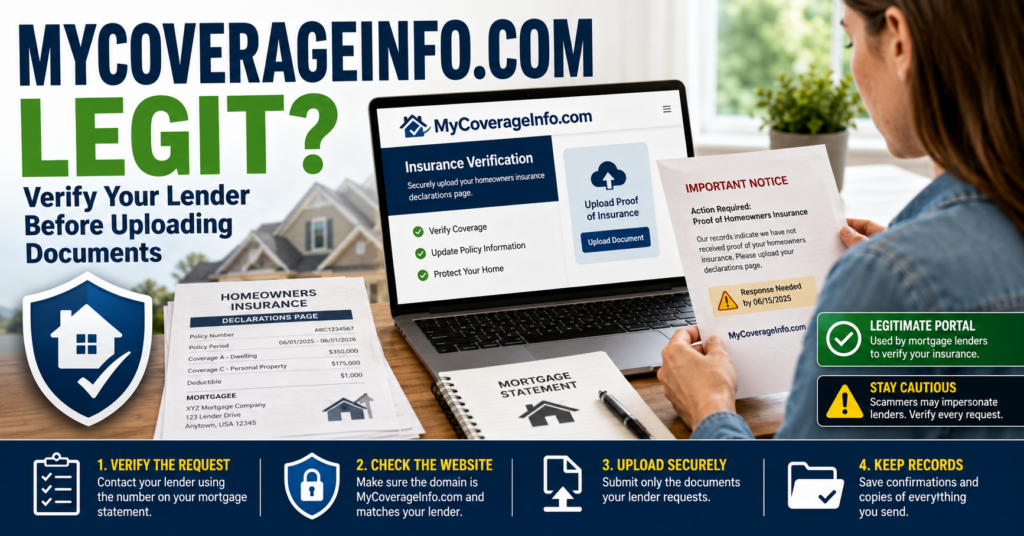
MyCoverageInfo.com scam or legit warning showing a homeowner verifying a mortgage insurance document request

Is MyCoverageInfo.com a Scam or Legit?

MyCoverageInfo.com appears to be a legitimate insurance-verification service used in mortgage servicing.

Mortgage lenders have a financial interest in the properties securing their loans. Mortgage agreements normally require borrowers to maintain adequate homeowners or hazard insurance and list the lender correctly in the policy’s mortgagee clause.

MyCoverageInfo.com helps participating lenders determine whether:

  • A homeowners insurance policy is active.
  • The insured property address is correct.
  • The lender is listed in the mortgagee clause.
  • The coverage amount satisfies the loan requirements.
  • The policy dates are current.
  • A replacement or renewed policy has been issued.
  • A previous policy was canceled.
  • Additional documents are needed.

Many homeowners search for “MyCoverageInfo.com scam” because the request arrives unexpectedly or asks for information connected to a valuable property and mortgage account.

That caution is reasonable, but the existence of the request does not by itself mean it is fraudulent.

What Is MyCoverageInfo.com?

MyCoverageInfo.com is an online portal used to collect and review evidence of insurance for mortgaged properties.

Depending on the lender or loan servicer, borrowers and insurance agents may use it to:

  • Locate a mortgage loan and associated property.
  • Review available policy information.
  • Upload a homeowners insurance declarations page.
  • Submit a renewed or replacement policy.
  • Correct an insurance carrier change.
  • Update a mortgagee clause.
  • Respond to a missing-insurance notice.
  • Provide proof that coverage remained active during a disputed period.

The portal is not an insurance company selling ordinary homeowners policies directly to every visitor. Its main purpose is helping mortgage servicers verify coverage connected to specific loans and properties.

Why Did I Receive a MyCoverageInfo.com Notice?

A request does not necessarily mean your policy has been canceled. It may mean that your mortgage servicer’s records are incomplete or do not match the information held by your insurer.

Your Policy Recently Renewed

Your insurance company may have renewed your policy, but the updated declarations page may not have reached the mortgage servicer yet.

You Changed Insurance Companies

If you switched carriers, your lender may have received a cancellation notice from the previous company before receiving proof of the replacement policy.

Your Mortgage Was Transferred

When mortgage servicing transfers to another company, the mortgagee information on your insurance policy may need to be updated.

The new servicer may not immediately receive complete policy records from the previous servicer.

The Mortgagee Clause Is Incorrect

Your insurance policy may list an old lender, incomplete company name, outdated address, or incorrect loan information.

Your Insurer Did Not Send the Document

Your agent may believe the lender received the declarations page even though it was sent to the wrong address, fax number, email address, or electronic system.

Your Coverage Appears Insufficient

The lender may believe the policy limit, deductible, policy type, or covered property does not satisfy the mortgage agreement.

The Servicer Cannot Match the Policy to Your Loan

A missing loan number, misspelled borrower name, incorrect address, or inconsistent mortgagee information can prevent automated systems from matching the policy correctly.

MyCoverageInfo.com/Rocket Mortgage

Searches for “MyCoverageInfo Rocket Mortgage,” “MyCoverageInfo.com/Rocket,” and “MyCoverageInfo.com/RocketMortgage” usually come from borrowers trying to verify a Rocket-branded insurance portal or notice.

Active MyCoverageInfo pages exist for Rocket Mortgage insurance verification. Those pages allow borrowers or insurance agents to locate a loan and submit updated insurance documentation.

Because more than one Rocket-related web path may appear in documents or search results, use the address shown in your official mortgage account, verified Rocket communication, or current loan documents.

Do not use a look-alike domain merely because it includes the words “Rocket,” “mortgage,” or “coverage.”

MyCoverageInfo.com/Chase

Chase officially directs mortgage borrowers to MyCoverageInfo.com/Chase for insurance updates and describes it as a secure, Chase-approved website.

Chase borrowers may be directed there after:

  • A homeowners policy renewal.
  • A change in insurance carrier.
  • A request for an updated declarations page.
  • A mortgagee-clause correction.
  • An insurance payment or escrow question.

Even with a confirmed Chase portal, verify that the web address ends in the real mycoverageinfo.com domain before uploading documents.

MyCoverageInfo and Freedom Mortgage

Freedom Mortgage borrowers may search for “MyCoverageInfo Freedom Mortgage” after receiving an insurance notice or trying to update proof of coverage.

Do not guess the correct web path from a search result or unofficial message. Log in to your Freedom Mortgage account or use the contact information printed on your mortgage statement and ask where your declarations page should be submitted.

This is especially important if the notice uses a web address different from MyCoverageInfo.com, requests payment, or asks for information unrelated to your homeowners insurance policy.

Is MyCoverageInfo.com Connected to Assurant?

Assurant’s official homeowners insurance support page directs people who received an insurance notice from their mortgage company to MyCoverageInfo.com.

Assurant provides insurance-tracking and lender-placed insurance services for mortgage companies. This connection helps explain why a MyCoverageInfo request may arrive after a servicer cannot confirm a borrower’s coverage.

The lender or servicer identified in your notice remains the best source for confirming which portal and submission instructions apply to your loan.

What Documents Does MyCoverageInfo Request?

The most commonly requested document is the homeowners insurance declarations page.

A declarations page normally identifies:

  • The named insured or homeowner.
  • The insured property address.
  • The insurance company.
  • The policy number.
  • The policy’s effective and expiration dates.
  • The coverage limits.
  • The deductible.
  • The mortgage lender or loan servicer.
  • The mortgagee clause.

The portal may also request a replacement-policy document, renewal notice, endorsement, insurance binder, flood insurance document, or proof that coverage was active during a specific period.

Is It Safe to Upload Documents to MyCoverageInfo.com?

Uploading an insurance declarations page to the real lender-specific MyCoverageInfo portal is a normal part of resolving many mortgage insurance-verification notices.

Before uploading:

  1. Confirm the domain is spelled exactly mycoverageinfo.com.
  2. Verify the lender name associated with the page.
  3. Reach the portal through your mortgage account or verified lender instructions when possible.
  4. Confirm that the property address and loan information belong to you.
  5. Upload only the insurance documents needed to resolve the request.
  6. Save a copy of the document and submission confirmation.

Do not upload unrelated tax returns, bank statements, payment-card details, account passwords, or identity documents merely because an unsolicited message requests them.

What Information May the Portal Request?

A legitimate lender-specific portal may need enough information to locate the correct mortgage and property, such as:

  • Your mortgage loan number.
  • The insured property address.
  • Your insurance policy number.
  • Your insurance company’s name.
  • Policy effective dates.
  • An electronic copy of the declarations page.

The exact requirements depend on the lender and the type of notice.

A request for immediate payment, gift cards, cryptocurrency, bank-login credentials, or a one-time security code is not a normal insurance-document verification request.

How to Verify a MyCoverageInfo Request Safely

  1. Read the entire notice. Identify the mortgage lender, property address, policy issue, and deadline.
  2. Check your mortgage account. Look for the same insurance warning in your secure online portal.
  3. Call the number on your mortgage statement. Do not rely only on a telephone number in an unexpected text or email.
  4. Contact your insurance agent. Ask whether the current declarations page was sent to the servicer.
  5. Confirm the mortgagee clause. Make sure the lender’s legal name and address are correct.
  6. Type the domain carefully. Avoid links with added words, misspellings, unusual domains, or unrelated web addresses.
  7. Keep submission proof. Save screenshots, confirmation numbers, upload receipts, emails, and copies of the documents.
  8. Check the status afterward. Confirm that the lender accepted the evidence and closed the insurance exception.

Warning Signs of a Fake MyCoverageInfo Message

The real MyCoverageInfo domain can be impersonated in fake letters, emails, text messages, advertisements, and calls.

The Web Address Is Misspelled

Watch for substituted letters, added hyphens, additional words, unusual domain endings, and web addresses that merely contain “mycoverageinfo” somewhere in a longer domain.

The Message Demands Payment

Submitting proof of insurance is different from paying a supposed verification fee.

Be cautious if the sender demands money before it will review your declarations page.

The Sender Requests a Password or Security Code

Do not share your mortgage-account password, email password, banking password, PIN, or one-time verification code.

The Notice Names a Lender You Do Not Use

A notice naming an unfamiliar mortgage company could be a wrong-number message, outdated record, servicing-transfer issue, marketing attempt, or scam.

The Property Address Is Wrong

Do not provide additional information merely to help an unsolicited sender correct a property address you do not recognize.

The Sender Threatens Immediate Foreclosure

Missing insurance documents can be important, but an unexpected sender claiming that your home will be seized within hours is using an extreme pressure tactic.

The Caller Wants Remote Access

Do not install software or give an unsolicited caller control of your phone or computer to upload an insurance document.

What Happens If You Ignore the Notice?

Do not automatically ignore a MyCoverageInfo request merely because it seems unfamiliar.

If your mortgage servicer cannot verify required homeowners or hazard insurance, it may begin the process of purchasing lender-placed or force-placed insurance.

Force-placed insurance is usually more expensive than insurance purchased by the homeowner and may provide less protection. It may primarily protect the lender’s financial interest rather than your belongings, liability, relocation expenses, or full rebuilding needs.

Federal mortgage-servicing rules generally require notices before a servicer charges a borrower for force-placed insurance. Responding with valid proof of coverage can prevent or correct unnecessary charges.

What If Force-Placed Insurance Was Already Added?

If you maintained qualifying homeowners insurance during the disputed period:

  1. Obtain declarations pages showing the complete coverage dates.
  2. Submit the documents through the verified lender channel.
  3. Ask the servicer to cancel the force-placed policy.
  4. Request removal or refund of charges for overlapping coverage.
  5. Keep written records of each submission and conversation.
  6. Send a formal notice of error if the servicer does not correct the account.
  7. Consider filing a complaint with the Consumer Financial Protection Bureau if the issue remains unresolved.

What If Your Insurance Company Already Sent the Policy?

Contact your insurer or agent and ask for proof showing:

  • When the declarations page was sent.
  • Where it was sent.
  • Which mortgagee clause was used.
  • Whether the loan number was included.
  • Whether a delivery or transmission confirmation exists.

Resubmitting the document through the verified portal may be faster than relying on the original transmission.

What If MyCoverageInfo Cannot Find Your Loan?

A loan may not be found because:

  • The loan number was entered incorrectly.
  • The mortgage was recently transferred.
  • The lender uses a different MyCoverageInfo web path.
  • The property address does not match the servicer’s format.
  • The insurance request belongs to another servicing system.
  • The notice itself is outdated or incorrect.

Do not repeatedly enter sensitive information into different websites. Contact your mortgage servicer using the number on your statement and ask for the correct insurance-verification route.

What If You Uploaded Information to a Fake Website?

If you entered information on a look-alike site:

  1. Save the complete web address and take screenshots.
  2. Stop communicating with the sender.
  3. Contact your mortgage servicer and insurance company.
  4. Change any password entered on the fake site.
  5. Change the password anywhere else you reused it.
  6. Secure the email account connected to your mortgage.
  7. Monitor your mortgage, insurance, bank, and credit accounts.
  8. Report identity theft if highly sensitive information was disclosed.

An insurance declarations page contains information that could be useful in additional impersonation attempts, including your name, property address, insurer, policy number, and lender.

Watch for follow-up calls claiming to represent your lender, insurer, escrow department, claims department, or fraud team.

Frequently Asked Questions

Is MyCoverageInfo.com legitimate?

Yes. MyCoverageInfo.com is a legitimate mortgage insurance-verification portal used by participating lenders, servicers, insurance agents, and insurance-tracking providers.

Is MyCoverageInfo.com a scam?

The real MyCoverageInfo.com website is not a scam by default. However, scammers could impersonate the domain or send unauthorized messages using its name. Verify the lender-specific request before submitting documents.

What is MyCoverageInfo?

MyCoverageInfo is an online system used to review and update evidence of homeowners or property insurance connected to mortgage loans.

Why is MyCoverageInfo contacting me?

Your mortgage servicer may be missing a declarations page, renewal, mortgagee clause, replacement policy, coverage confirmation, or proof that your insurance remained active.

Is MyCoverageInfo.com/Rocket legitimate?

Active Rocket-branded MyCoverageInfo portals are used for mortgage insurance updates. Confirm the precise address through your Rocket account, statement, or verified customer-service channel.

Is MyCoverageInfo.com/RocketMortgage legitimate?

A Rocket Mortgage-branded MyCoverageInfo portal exists. Because multiple Rocket-related paths may appear, use the address provided through an official Rocket channel rather than an advertisement or unsolicited message.

Is MyCoverageInfo.com/Chase legitimate?

Yes. Chase identifies MyCoverageInfo.com/Chase as a secure, Chase-approved website for submitting updated insurance information.

Does Freedom Mortgage use MyCoverageInfo?

A Freedom-branded MyCoverageInfo portal exists, but borrowers should confirm the current submission address through their Freedom Mortgage account or mortgage statement before uploading documents.

Is MyCoverageInfo associated with Assurant?

Assurant’s official homeowners insurance support page directs mortgage customers who received insurance notices to MyCoverageInfo.com.

What document should I upload?

The most commonly requested document is the current homeowners insurance declarations page. Read the notice carefully and ask your lender or insurance agent when you are unsure.

Does MyCoverageInfo need my Social Security number?

A typical insurance-verification request focuses on the mortgage loan, property, policy, and declarations page. Do not provide a full Social Security number to an unverified message, caller, or look-alike website.

What happens if I do not submit proof of insurance?

Your servicer may send additional notices and could eventually purchase force-placed insurance if it has a reasonable basis to believe the required coverage is missing.

Is force-placed insurance the same as homeowners insurance?

No. Force-placed insurance is purchased by the mortgage servicer to protect the property securing the loan. It is often more expensive and may provide less protection for the homeowner.

Bottom Line: MyCoverageInfo.com Scam or Legit?

MyCoverageInfo.com is a legitimate mortgage insurance-verification portal.

Chase officially identifies its MyCoverageInfo page as secure and approved, Rocket-branded insurance portals are active, and Assurant directs mortgage customers to MyCoverageInfo.com when insurance documentation is needed.

That does not make every message or link genuine. Verify that the request matches your mortgage lender, property, and insurance policy. Use your lender’s official account or the number printed on your mortgage statement before uploading documents.

Do not ignore a verified insurance notice. Missing documentation can lead to lender-placed insurance charges even when you already have an active policy.

Official Consumer Resources

Related Scam and Verification Warnings

Consumers researching MyCoverageInfo.com may also want to review these related verification, mortgage, billing, and account-contact warnings:

Have You Received a MyCoverageInfo.com Request?

Share your experience below to help other homeowners understand how these requests work.

  • Which lender or mortgage servicer was named?
  • Did the notice mention Rocket Mortgage, Chase, Freedom Mortgage, or another company?
  • Did you receive a letter, email, text, or phone call?
  • What insurance document was requested?
  • Did your insurance company already send the declarations page?
  • Was the request confirmed through your mortgage account?
  • Did the portal accept your document?
  • Was lender-placed insurance added or removed?

Please do not post your mortgage loan number, policy number, complete property address, telephone number, email address, account login, Social Security number, declarations page, or other sensitive information in the comments.

Disclaimer

ThinkItsAScam.com is an independent consumer information website and is not affiliated with MyCoverageInfo.com, Assurant, Chase, Rocket Mortgage, Freedom Mortgage, insurance companies, mortgage servicers, or government agencies. MyCoverageInfo.com appears to be a legitimate insurance-verification portal used by participating mortgage companies. This article discusses legitimate insurance requests, possible impersonation attempts, mortgage-servicing concerns, and lender-placed insurance risks. It does not claim that every notice, lender, employee, insurance provider, or customer associated with MyCoverageInfo is fraudulent. Verify current instructions through your mortgage statement, secure lender account, insurance agent, or official company website. This article is for general educational purposes and is not legal, financial, mortgage, or insurance advice.

No comments:

Post a Comment