If you are searching for “Mein Shop scam,” “Mein Shop legit,” “what is Mein Shop,” or “Mein Shop online shopping,” you may have received an unexpected order, invoice, text message, email, or notification from a seller identified as Mein Shop.
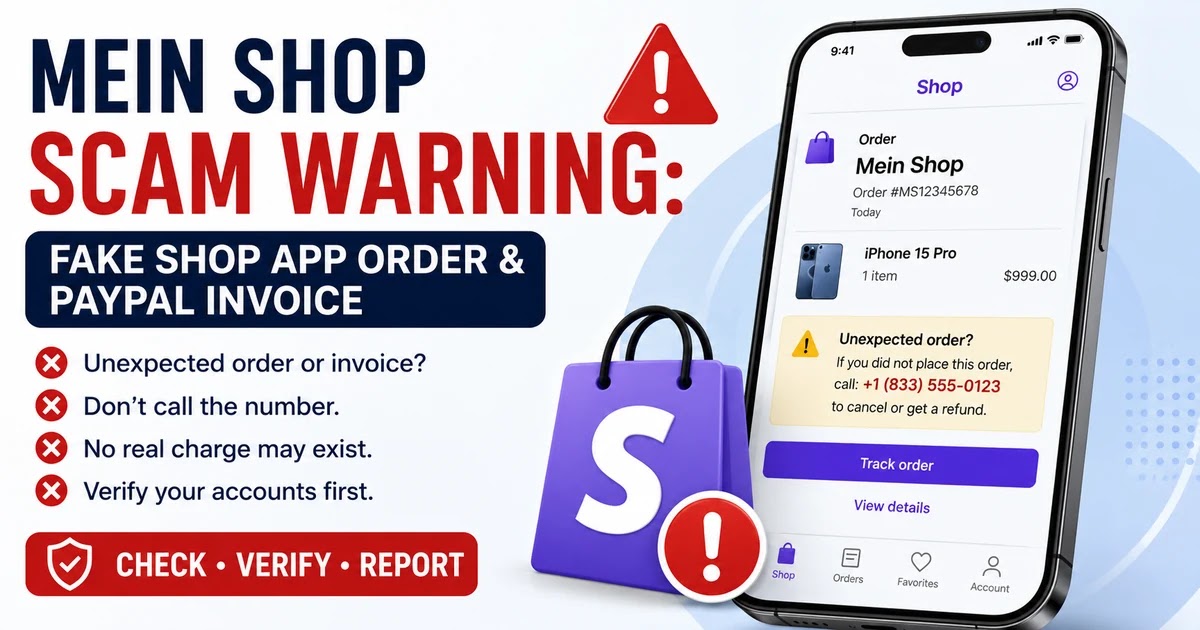
Recent reports connect the name Mein Shop with fake purchase notifications appearing in the Shopify Shop app or in PayPal-style invoices. The message may claim that an expensive iPhone, gift card, computer, antivirus subscription, or other product has been ordered.
The notification commonly includes a telephone number that recipients are told to call if they did not authorize the purchase. That callback number is usually the most dangerous part of the message.
If you did not place the order, do not call the telephone number, click an included link, pay an invoice, provide a verification code, or install software. Open your bank, credit-card, PayPal, or Shop account independently and determine whether a real transaction exists.
This warning concerns unexpected Mein Shop orders and invoices. It does not mean that every unrelated business or online store using the generic words “Mein Shop” is fraudulent.
What Is Mein Shop?
Mein Shop translates to “my shop” in German and can be used as a generic online-store name.
In the scam reports discussed here, Mein Shop does not appear to identify one clearly verified retailer. Instead, the name is displayed as the merchant or store associated with an unexpected order notification.
Some recipients report seeing the order inside Shop, the legitimate shopping and order-tracking app operated by Shopify. Others may receive a text, email, purchase confirmation, or PayPal-style invoice using similar language.
How Does the Mein Shop Scam Work?
A typical Mein Shop fake-order scam follows this pattern:
- You receive an unexpected order notification, text message, email, or invoice.
- The merchant or seller is identified as Mein Shop or another generic store name.
- The message claims that an expensive product or subscription has been purchased.
- A telephone number is included for cancellations, disputes, refunds, or customer support.
- You call the number because you are worried that your card or PayPal account was charged.
- A scammer answers while pretending to represent PayPal, Shop, Shopify, Apple, a security company, or a billing department.
- The caller asks for account information, card details, a one-time security code, a payment, or remote access to your computer or phone.
The fake order is designed to create panic. The scammer wants you to react to the large purchase before checking whether an actual transaction exists.
Why Did Mein Shop Appear in the Shop App?
Shop is designed to collect order confirmations, receipts, shipment information, and delivery updates in one location.
Orders can be associated with Shop through several sources, including Shop Pay transactions, an email address connected with the Shop account, and order information found in a linked email account.
Cybersecurity researchers have documented fake receipts appearing alongside legitimate Shop orders. However, the precise method used to insert every fraudulent order has not been publicly confirmed.
The fake record may involve an abusive merchant workflow, email parsing, account association, or another feature being misused by scammers.
The order record and the financial transaction are separate things. Check your bank, credit-card, and PayPal activity directly before assuming that a real charge occurred.
Was I Actually Charged by Mein Shop?
Do not rely on the amount shown in the message or Shop order record.
Verify the claimed charge independently:
- Close the suspicious notification.
- Do not use its link or telephone number.
- Open your bank or card issuer’s official mobile app yourself.
- Review completed and pending transactions.
- Open PayPal directly through its official app or by entering the address yourself.
- Review PayPal Activity for unfamiliar payments, invoices, or money requests.
If no matching transaction appears, the notification itself is not proof that your money was taken.
If an unauthorized transaction does appear, contact the bank, credit-card issuer, or payment provider using the number printed on your card, statement, or official website.
Is the Shop App a Scam?
No. Shop is a legitimate shopping and order-tracking application operated by Shopify.
The current warning concerns scammers misusing order notifications or other platform features to make a fraudulent purchase claim appear more trustworthy.
A legitimate application can still display content created by a dishonest merchant or generated through a feature that criminals have found a way to misuse.
Do not assume that every order shown inside a legitimate app has been independently verified as genuine.
Is the Mein Shop PayPal Invoice Real?
An unfamiliar PayPal invoice or money request should not be treated as proof that you purchased something or that PayPal automatically charged you.
PayPal warns that invoice scams may:
- Request payment for a product or service you never ordered
- Include an alarming note claiming that immediate action is required
- Tell you to call a fake customer-service number
- Direct you to a suspicious website
- Attempt to obtain personal or financial information
Do not pay the invoice and do not call a number included in the invoice note.
Instead, log in to PayPal independently, open the invoice or money request through the Activity section, and use PayPal’s reporting option.
Warning Signs of a Mein Shop Scam
You Did Not Place the Order
An unexpected order for an unfamiliar product is the most important warning sign.
The Message Includes a Callback Number
A fake invoice may tell you to call immediately to cancel the order, stop a payment, or obtain a refund.
Do not call the listed number. Obtain support information independently.
The Product Is Expensive
Scammers often mention iPhones, computers, gift cards, antivirus subscriptions, or other high-value purchases because a large amount is more likely to cause panic.
The Seller Name Is Generic
Names such as Mein Shop or My Store do not clearly identify the supposed merchant or explain what was purchased.
The Telephone Number Appears in an Unusual Location
The callback number may appear in the product description, order notes, shipping information, or another field that would not normally be used for customer support.
The Wording Is Awkward
Watch for unusual capitalization, spelling mistakes, poor grammar, mixed currencies, or phrases such as:
- If order not placed by you
- Call immediately for cancellation
- Do not accept the PayPal payment
- Contact billing support
- Your account will be charged today
The Caller Requests a Verification Code
Never give an unexpected caller a PayPal, banking, email, Apple, Google, or Shop verification code.
A security code may allow the caller to log in, reset a password, add a device, or complete a transaction.
The Caller Wants Remote Access
A supposed refund or cancellation agent may ask you to install screen-sharing or remote-access software.
Do not allow an unknown person to control your computer or phone.
The Caller Requests an Unusual Payment
End the conversation if the caller asks for:
- Gift cards
- Cryptocurrency
- A wire transfer
- A payment-app transfer
- Cash
- A payment to a so-called secure account
What Should You Do After Receiving a Mein Shop Order?
- Do not call the telephone number in the order.
- Do not click links or reply to the sender.
- Take a screenshot. Preserve the merchant name, product, amount, date, order number, email address, and telephone number without posting them publicly.
- Check your financial accounts independently. Review your bank, credit-card, and PayPal activity.
- Report the order in Shop. Open the order, tap the menu, select Report incorrect information, and choose Not my order or This is spam.
- Report an unfamiliar PayPal invoice. Open it through PayPal Activity and choose the available report option.
- Forward PayPal impersonation emails to phishing@paypal.com.
- Block the sender or callback number.
- Watch for follow-up scams. The same operation may contact you later while pretending to represent a bank, fraud department, police agency, or technology company.
What If You Already Called the Mein Shop Number?
You Called but Shared Nothing
If you ended the call without providing information, installing software, sharing a verification code, or sending money:
- Block the telephone number
- Do not answer follow-up calls
- Check your financial accounts
- Report the suspicious order or invoice
- Remain alert for additional phishing messages
Calling alone does not necessarily give the scammer access to your accounts. However, it may confirm that your telephone number is active.
You Shared a Password or Verification Code
Act immediately:
- Change the affected account password through the official website or app.
- Change the password anywhere else you reused it.
- Enable multi-factor authentication.
- Review recent logins, devices, recovery information, and transactions.
- Contact the affected company through an independently verified support route.
- Secure your email account because it may be used to reset other passwords.
You Shared Card or Bank Information
Contact your bank or card issuer immediately using the number printed on your card or statement.
Explain what information was provided and ask whether the account or card should be locked, replaced, or monitored.
Review both pending and completed transactions. Criminals may attempt small test charges before making larger purchases.
You Installed Remote-Access Software
- Disconnect the affected device from the internet.
- End the remote-access or screen-sharing session.
- Do not use the device for banking or other sensitive accounts.
- Remove the remote-access application.
- Run a complete security scan.
- Change important passwords from another trusted device.
- Contact your financial institutions if the scammer could see account information.
- Consider professional technical assistance if you are unsure whether the device is secure.
You Sent Money
Contact the payment provider or financial institution immediately.
Ask whether the payment can be stopped, recalled, disputed, or investigated. Recovery is not guaranteed, but reporting quickly may improve the available options.
Save the invoice, screenshots, telephone numbers, receipts, payment confirmations, emails, texts, and call records.
Frequently Asked Questions
Is Mein Shop a scam?
An unexpected Mein Shop order or invoice that tells you to call a telephone number is likely part of a fake-purchase or callback-phishing scam. Do not call the number. Check your actual bank, card, PayPal, and Shop accounts independently.
Is Mein Shop legit?
Mein Shop is a generic name rather than one clearly identifiable company in the reported scam. An unrelated legitimate business may use similar words. The warning applies specifically to unexpected orders, invoices, or payment claims that you did not authorize.
What is Mein Shop?
Mein Shop translates to “my shop” in German. In current scam reports, it appears as the merchant name associated with an unexpected Shop app order or PayPal-style invoice.
Why is Mein Shop showing in my Shop app?
Shop collects order information from several sources. Researchers have documented scammers placing fake purchase claims inside shopping-app order experiences, although the exact technical route used for every fraudulent order has not been confirmed.
Does a Mein Shop order mean my account was hacked?
Not necessarily. An unexpected order record does not by itself prove that your Shop, email, PayPal, bank, or credit-card account was compromised. Check each account independently for unauthorized logins, account changes, or transactions.
Was my card charged?
The notification alone does not prove that a charge occurred. Open your bank or card issuer’s official app and review both pending and completed transactions.
Should I call the Mein Shop customer-service number?
No. Do not call a telephone number included in an unexpected order or invoice. Use independently verified contact information for your bank, card issuer, PayPal, Shop, or the company being impersonated.
What should I do with a Mein Shop PayPal invoice?
Do not pay it. Open PayPal independently, locate the invoice or money request in Activity, and use PayPal’s reporting or decline option.
Official and Consumer Resources
- Shop Help – Report Incorrect Order Information
- Shop Help – Identify and Report Suspected Fraud
- PayPal – Invoice and Money Request Scams
- PayPal – Report a Suspicious Invoice
- PayPal – Report Suspicious Messages
- FTC – Recognize and Avoid Phishing Scams
- FTC – Avoid Tech-Support and Fake Refund Scams
- ReportFraud.ftc.gov
- IdentityTheft.gov
- Gen Digital – Fake Invoices in Shopping Apps
Related ThinkItsAScam.com Warnings
- Geek Squad Subscription Scam Warning – Fake invoices that direct recipients to fraudulent callback numbers.
- Webroot Scam Email Warning – Fake security renewals and refund calls.
- Microsoft Security Alert Scam Warning – Fake support messages, callback numbers, and remote-access requests.
Did You Receive a Mein Shop Order or Invoice?
Share the non-sensitive details of the message below to help other consumers recognize current versions of the scam.
- Did the message appear in the Shop app, PayPal, email, or a text?
- What product did it claim you purchased?
- What amount and currency were shown?
- Did the order include a callback number?
- Did a matching transaction appear in your bank or PayPal account?
- Did you call, click a link, or report the order?
- How did Shop, PayPal, or your bank respond?
Please do not post your full name, telephone number, email address, home address, order number, payment-card information, PayPal account information, password, security code, or other sensitive personal information in the comments.
Page reviewed and updated: August 17, 2026.
Disclaimer
ThinkItsAScam.com is an independent consumer-information website and is not affiliated with Mein Shop, Shop, Shopify, PayPal, Apple, Norton, McAfee, Gen Digital, the Federal Trade Commission, financial institutions, or any merchant, application, company, payment provider, or government agency mentioned in this article. Shop, Shopify, and PayPal are legitimate services. This article discusses fraudulent orders, fake invoices, phishing messages, callback scams, impersonation attempts, and unauthorized use of company or platform names. It does not claim that every unrelated business using the generic name Mein Shop is fraudulent or that Shop, Shopify, PayPal, or an impersonated company was breached. Scam wording, merchant names, products, amounts, telephone numbers, reporting procedures, and platform features can change. This article is provided for general consumer education and is not legal, financial, cybersecurity, or technical advice.
Leave a Reply