Trending update · Reviewed October 3, 2026
Webroot is a legitimate cybersecurity brand owned by OpenText. The “Webroot scam” discussed here is impersonation: fake renewal or invoice emails use its name to push recipients into calling a fraudulent support number. A Webroot email scam may claim an expensive charge without any matching payment on your account.
Before you call or pay: open your bank or card account independently and check for the claimed transaction. Verify any real subscription through Webroot’s official website. Do not use an unexpected invoice’s phone number or give a caller remote access to obtain a refund.
Is Webroot a Scam?
No. Webroot is a legitimate cybersecurity brand.
Webroot currently sells antivirus, internet-security, identity-protection, and related cybersecurity products and is part of OpenText.
However, criminals frequently impersonate legitimate technology companies because consumers recognize their names. Fake subscription-renewal scams have also impersonated companies such as Geek Squad, Norton, McAfee, and other security or technical-support brands.
The legitimate company may send genuine account and renewal notices to real customers. The scammer copies the Webroot name and branding to make a fake invoice look trustworthy.
Is There a Webroot Renewal Scam Going On?
Fake Webroot renewal invoices are a documented impersonation pattern. This October 3, 2026 refresh reviews that pattern and official verification options; it does not establish a newly confirmed campaign or identify the operators behind a particular message.
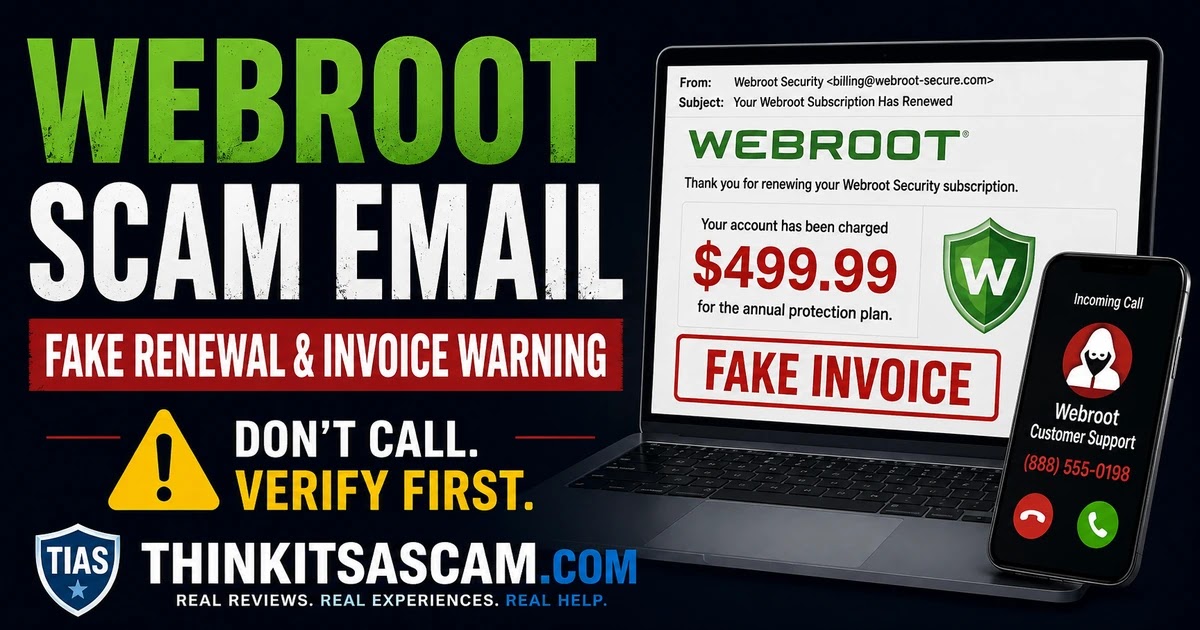
A Webroot community warning dated December 11, 2020 described a fake invoice claiming a $499.99 charge and asking the recipient to call about it. That is a historical example, not a newly verified October 2026 message.
The Federal Trade Commission also warns about this type of tech-support subscription scam. A fake renewal message claims that you have been or soon will be charged hundreds of dollars and tells you to call to cancel.
FTC – How to Spot, Avoid, and Report Tech Support Scams
What Do Fake Webroot Renewal Emails Say?
The following are warning signs and example claims to check, not a list of newly verified messages.
Fake notices may claim:
- Your Webroot subscription renewed automatically.
- A Webroot membership has been extended for one, two, three, or four years.
- Your saved Visa, Mastercard, bank account, or other payment method will be charged.
- A payment of approximately $400 to more than $600 is scheduled.
- You purchased a Webroot Premium or security-protection package.
- An invoice or billing statement has already been generated.
- You must call customer service immediately to cancel.
- A refund is available only if you contact the billing department before the payment processes.
A precise dollar amount does not authenticate an invoice. Compare it with your actual account and statement before taking action.
The exact amount, membership length, invoice number, product name, and telephone number can change. The basic strategy remains the same: make you fear an expensive charge so that you contact the scammer.
How the Webroot Scam Email Works
Many of these emails are better described as refund or tech-support scams than traditional password-stealing phishing emails.
The phone number is often the most important part of the scam.
- You receive a fake Webroot invoice, receipt, or renewal notice.
- The message claims a large payment has been or will soon be processed.
- You become worried because you never purchased Webroot or do not remember having a subscription.
- The email tells you to call a customer-service or cancellation number.
- A scammer answers while pretending to work for Webroot billing or support.
- You are told that the supposed charge can be cancelled or refunded.
- The caller may request banking information, card information, security codes, or remote access to your computer.
- The scammer then attempts to steal money, credentials, or personal information.
Why Do They Want You to Call?
A telephone conversation gives the scammer an opportunity to create urgency and guide the victim through additional steps.
The caller may claim:
- Your refund cannot be processed normally.
- You must log into your online bank account.
- You need to install remote-support software.
- A refund was accidentally issued for too much money.
- You must return an “overpayment.”
- Your computer has viruses or security problems.
- Your bank account must be verified before the subscription can be cancelled.
The FTC warns that refund scammers may manipulate victims into believing that too much money was refunded and then demand that the supposed excess be returned through gift cards or another payment method.
Does Webroot Really Have Automatic Renewal?
Yes. This is one reason the scam can sound believable.
Webroot offers legitimate automatic subscription renewal and an official form for changing renewal preferences. A real subscription can renew, so verify your account rather than treating every renewal email as fraudulent.
Webroot also provides official pages for managing auto-renewal, accessing an account, and requesting eligible refunds.
If you really purchased Webroot and enabled automatic renewal, a genuine renewal is possible. Verify it by signing into your Webroot account independently and checking your actual financial statement — not by calling the telephone number contained in an unexpected email.
How Can I Tell If a Webroot Renewal Email Is Real?
Do not rely on the logo, display name, invoice number, professional formatting, or sender name alone.
Instead:
- Do not call the number in the email.
- Do not click the email’s account or cancellation links.
- Open a new browser window and go directly to Webroot.com.
- Sign into your actual Webroot account if you have one.
- Check your credit card or bank statement for the claimed transaction.
- Use Webroot’s official support page if you still need assistance.
I Never Signed Up for Webroot — Why Did I Get the Email?
Receiving a fake Webroot invoice does not mean that you actually have a Webroot account.
Scammers can send large numbers of emails to addresses obtained from marketing databases, data breaches, public sources, compromised mailing lists, or other sources.
They do not need to know whether you use Webroot.
In fact, telling thousands of people that they were charged hundreds of dollars works partly because some recipients will be so confused by a product they never purchased that they immediately call the cancellation number.
What If the Email Says I Have a Three- or Four-Year Webroot Membership?
An email may describe a multi-year membership. The stated duration is another claim to verify, not evidence that you purchased that subscription.
Do not assume that a detailed membership term makes the email authentic.
A scammer can generate:
- A fake customer ID
- A fake invoice number
- A fake renewal date
- A fake product name
- A fake subscription period
- A fake payment total
- A fake support telephone number
Verify whether any subscription actually exists through Webroot’s official account system.
What If There Really Is a Webroot Charge on My Card?
A real charge requires a different response from an email that merely claims you were charged.
If an actual Webroot-related transaction appears on your bank or card statement:
- Check whether you previously purchased Webroot.
- Ask whether another authorized household member purchased or renewed the software.
- Review your Webroot account and receipts.
- Verify whether automatic renewal was enabled.
- Contact Webroot through its official support or refund pages.
- If you cannot identify or authorize the transaction, contact the financial institution that issued your card.
Webroot’s consumer refund page states a 70-day money-back guarantee subject to the applicable license agreement. Subscriptions purchased through Best Buy or Geek Squad are managed separately: Webroot directs those customers to Best Buy for account changes, renewal cancellation and refunds. Use the official support route associated with your purchase.
If you need help researching a genuinely unfamiliar transaction, see Unrecognized Credit Card or Bank Charge: What to Do on ChargeOnMyCard.com.
Webroot Invoice Scam Warning Signs
You Never Purchased Webroot
An unexpected invoice for a security product you never bought is a major warning sign.
The Claimed Charge Is Hundreds of Dollars
Large amounts are often used to generate an emotional response and make the recipient act before verifying the transaction.
The Email Tells You to Call Immediately
A fake invoice often creates an artificial cancellation deadline or says the charge will become permanent unless you call within a few hours.
The Phone Number Is the Main Call to Action
A professionally formatted invoice may exist mainly to persuade you to call a fraudulent support center.
You Are Asked to Install Remote-Access Software
Do not install remote-control or screen-sharing software because an unsolicited billing caller says it is necessary to issue a refund.
You Are Told to Log Into Online Banking
A supposed support representative should not need to watch or control your computer while you access your bank account.
You Are Asked to Pay Back an Accidental Refund
This is a known refund-scam tactic. The scammer may create the appearance that too much money was returned and then demand repayment.
Should I Call the Phone Number in the Webroot Email?
No, not if the message is unexpected or suspicious.
Even if the telephone number looks local or the caller ID later displays a recognizable company name, obtain Webroot’s current support information independently through Webroot.com.
Do not use the email itself as your source for verification.
How to Report a Webroot Scam Email
Report the message without replying to its sender or calling its callback number.
If you receive a suspicious Webroot-branded message:
- Use your email provider’s Report phishing or Report spam function.
- Report fraud attempts to the Federal Trade Commission at ReportFraud.ftc.gov.
- If you are uncertain whether a message is connected to a genuine account, contact Webroot through its official support page.
- Preserve the email if you lost money, gave someone remote access, or need it as evidence for your bank or law enforcement.
Do not reply to the scammer merely to tell them that you know the email is fraudulent.
What If I Already Called the Fake Webroot Number?
If you called but did not provide information, install software, or send money, end communication and block the number.
If you provided information or allowed remote access, take additional action immediately.
- Disconnect the scammer’s remote session.
- Remove unfamiliar remote-access software.
- Update your security software and run a trusted security scan.
- Change passwords that may have been visible or disclosed.
- Enable multi-factor authentication where available.
- Contact your bank or card issuer if financial information was exposed.
- Review recent transactions.
- Report the incident to the FTC.
What If the Scammer Accessed My Bank Account?
Contact your financial institution immediately using the number printed on your card or shown in your bank’s official app or website.
Tell the institution that a suspected tech-support or refund scammer may have viewed or accessed your account.
If the scammer instructed you to transfer money, buy gift cards, send cryptocurrency, or use a payment app, contact that payment provider immediately and ask whether the transaction can be stopped or reversed.
Frequently Asked Questions
Is Webroot a scam?
No. Webroot is a legitimate cybersecurity brand operated by OpenText. However, scammers impersonate Webroot in fake renewal emails, invoices, receipts, and tech-support scams.
Are there Webroot scam emails being sent?
Webroot impersonation emails are an established scam pattern. This October 3, 2026 review does not verify a new campaign, a current sender address or a new callback number. Assess the message you received through your actual account and official support.
Is there a Webroot renewal scam going on?
Yes. An unexpected Webroot renewal email that claims a large charge and tells you to call an unfamiliar telephone number should be treated as suspicious. Verify any real subscription independently through Webroot’s official website.
What is the Webroot email scam?
The Webroot email scam usually impersonates the legitimate antivirus company and sends a fake invoice or renewal notice. The goal is often to make the recipient call a fraudulent support number, where the scammer attempts to obtain money, financial information, or remote access to the victim’s computer.
Does Webroot send legitimate renewal emails?
Real Webroot subscriptions and automatic renewals exist. A renewal message can therefore be genuine, but the logo and email wording do not authenticate it. Check your account, receipts and payment history independently through official channels.
Why did I receive a Webroot invoice if I never signed up?
Scammers often send fake invoices in bulk without knowing whether the recipient actually uses Webroot. Receiving the email does not prove that an account or transaction exists.
What if the email says Webroot charged me $500 or $600?
Check your actual card or bank account. If no matching charge appears, the amount in the email may simply be bait designed to make you call. If a real transaction appears, contact Webroot and your financial institution through independently verified channels.
Where do I report a Webroot scam email?
Use your email provider’s phishing-report feature and report the scam through ReportFraud.ftc.gov. If you need to determine whether an actual Webroot account or charge exists, use Webroot’s official support page.
Official Webroot and Consumer Resources
- Webroot Official Support
- Webroot Auto-Renewal Management
- Webroot Official Refund Page
- FTC Tech Support Scam Guidance
- Report Fraud to the FTC
Related ThinkItsAScam.com Warnings
If the warning appears on your screen using McAfee branding, our McAfee popup scam guide explains safe closing steps and how to stop unwanted browser notifications.
- Geek Squad Subscription Scam: Fake Renewal & Invoice Warning
- Microsoft Security Alert Scam: Pop-Up, Email & Phone Warning
Have You Received a Webroot Scam Email?
Share the non-sensitive details of your experience below to help other consumers recognize current versions of the scam.
- What amount did the email claim you owed?
- Did it describe a one-year or multi-year Webroot membership?
- Did the message include a telephone number?
- Did you actually have a Webroot subscription?
- Was there a matching transaction on your bank or credit-card statement?
- Did the caller request remote access to your computer?
- Did they ask you to log into online banking?
- Were you asked to send money or return an alleged overpayment?
Please do not post your complete telephone number, email address, account number, Webroot keycode, invoice number, bank information, payment-card details, passwords, security codes, or other sensitive personal information in the comments.
Page reviewed and updated: October 3, 2026.
Disclaimer
ThinkItsAScam.com is an independent consumer information website and is not affiliated with Webroot, OpenText, Best Buy, Geek Squad, the Federal Trade Commission, any bank, card issuer, or other organization mentioned in this article. Webroot is a legitimate cybersecurity brand. This article concerns fraudulent emails, invoices, renewal notices, support calls, and refund scams that may misuse Webroot’s name or branding. Genuine subscriptions, billing arrangements, renewal terms, refund policies, products, and support information can change. Verify account-specific information directly through official Webroot channels. This article is provided for general consumer information and is not financial, legal, or cybersecurity advice.
Leave a Reply