If you searched for Total Drive scam or TotalDrive.com scam, you may be trying to determine whether the cloud-storage service is legitimate, why a charge appeared on your statement, or whether an urgent storage warning can be trusted.
Total Drive is a real cloud-storage service operated by Total Security. However, it is separate from Apple iCloud, Google Drive, Google One, Microsoft OneDrive, Samsung Cloud, and the storage built into your phone or computer. Consumers should verify the offer, renewal price, sender, and website before entering payment information.
Quick Verdict: Total Drive is a legitimate service, but verify the offer and every charge.
TotalDrive.com is an operating cloud-storage website with official applications, published subscription terms, and support pages. It is not a fabricated website selling a nonexistent product.
However, consumer concerns include low introductory offers, higher automatic-renewal prices, unexpected add-on charges, cancellation and refund problems, and promotions that some users say they mistook for warnings from Apple or another storage provider.
A real company can still be impersonated. An unexpected email, pop-up, advertisement, or payment page should be evaluated separately before you click or pay.
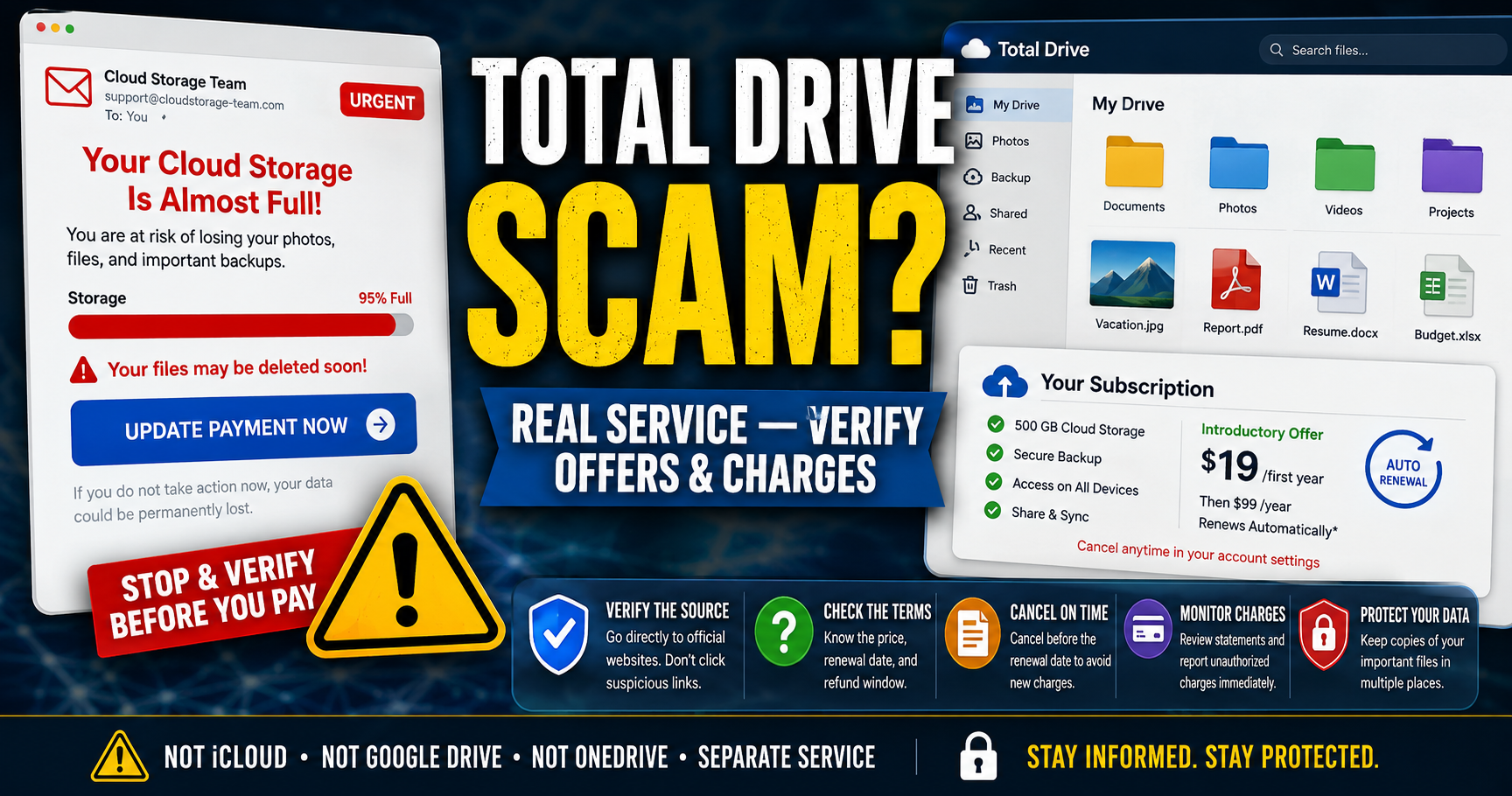
Is TotalDrive.com a Scam or Legit?
TotalDrive.com is the official website of a legitimate cloud-storage service. The company’s current terms identify Total Security Limited, Total Security U.S. LLC, and their affiliates as part of Point Wild. The same group offers products using names such as TotalAV, Total Adblock, Total VPN, and Total Password.
Total Drive offers file storage, backup, synchronization, sharing, and access across supported devices. Its mobile application is also listed in Apple’s App Store under the Total Security Limited developer account.
Legitimate does not mean that every consumer will be satisfied or that every message using the Total Drive name is genuine. Before subscribing, confirm:
- That the website address ends in totaldrive.com.
- Which storage plan and billing term you are buying.
- The introductory price and regular renewal price.
- Whether any additional products or add-ons are included.
- When the subscription will renew automatically.
- How to cancel and how long you have to request a refund.
What Is Total Drive?
Total Drive is an independent cloud-storage and file-backup service. Customers can use it to upload, store, synchronize, share, and access files through supported devices.
The official website is TotalDrive.com.
Because Total Security offers several related products, a customer may see offers involving Total Drive, TotalAV, Total Adblock, Total VPN, Total Password, or other services. The company’s terms state that each service and add-on can be treated as a separate subscription for billing and cancellation purposes.
Important: Total Drive does not add storage to iCloud, Google Drive, Google One, Microsoft OneDrive, Samsung Cloud, or the physical storage inside a phone or computer. It gives you space through a separate service and account.
Is Total Drive the Same as iCloud?
No. Total Drive is not Apple iCloud and does not increase the storage capacity of your iCloud account.
If your iPhone or iPad says that iCloud storage is full, verify the warning directly:
- Open Settings.
- Tap your name.
- Tap iCloud.
- Review your current storage usage and iCloud+ plan.
Be cautious if an advertisement or pop-up appears to offer more iCloud space but takes you to TotalDrive.com or another company. Read the entire checkout page and verify which service you are purchasing.
Is Total Drive the Same as Google Drive or OneDrive?
No. Total Drive is not Google Drive, Google One, Gmail, Google Photos, or Microsoft OneDrive.
If a message says your Google or Microsoft storage is full, open the official application or type the provider’s website address yourself. Do not use a button in an unexpected email. Buying Total Drive will not increase the storage attached to your Google or Microsoft account.
Why Are People Searching for “Total Drive Scam”?
People often add the word “scam” to a search when they are confused by a subscription, dissatisfied with a purchase, investigating an unfamiliar charge, or checking a suspicious message. The search term alone does not prove criminal fraud.
Common questions and complaint themes include:
- A low introductory price followed by a higher renewal price.
- Not realizing that the plan renews automatically.
- Believing the purchase would expand iCloud or another provider’s storage.
- Receiving an urgent, generic “cloud storage full” email or pop-up.
- Finding a Total Drive or Total Security charge on a statement.
- Purchasing an add-on or second service during checkout.
- Difficulty identifying the correct cancellation route.
- Expecting cancellation to produce an automatic refund.
A confusing renewal or disappointing product is not automatically a scam. An unauthorized charge, counterfeit website, phishing message, or deliberately deceptive advertisement should be treated as a separate and potentially serious problem.
Total Drive Pricing and Automatic Renewal
Total Drive uses automatically renewing subscriptions. A discounted first term may renew at the regular rate shown during checkout, in the confirmation email, and in the customer portal.
As reviewed on August 29, 2026, an official Total Drive promotion advertised 500 GB of cloud storage for $19 for the first year, followed by a displayed regular annual rate of $99. The offer also listed one Total Adblock license as included. Promotions, prices, storage limits, and bundles can change, so verify the current terms before paying.
Before completing a purchase, record:
- The amount due today.
- The regular renewal amount and next billing date.
- The billing frequency.
- The storage allowance.
- Every included product, upgrade, and add-on.
- The cancellation and refund deadlines.
Save a screenshot of the final checkout page and the order-confirmation email. These records can help if the amount charged differs from what you expected.
Is the $1.99 Total Drive Offer Legitimate?
Consumers report encountering Total Drive offers that begin at $1.99. A small introductory payment does not by itself prove that an offer is fraudulent, but it may lead to a recurring subscription or a checkout flow containing additional products.
Do not judge the purchase only by the amount due today. Confirm the full billing term, renewal price, renewal date, and every selected add-on before submitting payment.
Also inspect the full website address. A phishing page can copy a real company’s name, images, and pricing while sending payment details to a scammer.
How to Check Whether a Total Drive Email Is Real
Do not assume a message is genuine merely because it contains the Total Drive name or familiar cloud-storage language.
Warning signs include:
- The sender address does not match the company named in the message.
- The message says your files will be deleted within hours.
- It refers only to “Cloud Storage,” “Cloud Team,” or “Storage Department.”
- It makes Total Drive appear to be iCloud, Google Drive, or OneDrive.
- The button leads to a shortened link or unrelated domain.
- The page requests an Apple, Google, Microsoft, email, or banking password.
- The message asks you to call an unfamiliar telephone number.
- You have no Total Drive account but are told that your renewal failed.
Instead of clicking the message, open a new browser window, type totaldrive.com, and sign in through the official site. Check whether the same notice or subscription appears in your account.
Can a Misleading Message Lead to the Real TotalDrive.com?
Yes. A message can be misleading even when the final link opens a real product website.
An affiliate, advertising network, or lead-generation page could use urgent wording to persuade someone to buy a legitimate service. A scammer could also imitate Total Drive and send victims to a counterfeit payment page. The destination alone does not prove who created or approved the original message.
Save the sender address, complete link, advertisement, and checkout page if you believe an offer misrepresented the product or its connection to another company.
Total Drive Reviews and Complaints
Total Drive has a mixture of positive and negative user-submitted reviews. When checked on August 29, 2026, its claimed Trustpilot profile displayed a 4.1 out of 5 score based on approximately 3,180 reviews. Trustpilot also indicated that the company asks customers to leave reviews.
Positive reviews commonly mention an easy setup, simple file backup, convenient photo storage, and helpful support. Negative reviews allege unexpected payments, confusion about $1.99 offers and renewals, difficulty canceling, unwanted emails, or believing an offer was connected to Apple or another provider.
Apple’s App Store also lists both favorable ratings and consumer complaints. Reviews are personal accounts and are not a scientific sample. A high rating does not guarantee a problem-free experience, while a negative review does not independently prove fraud.
You can examine the current feedback on Trustpilot and Apple’s App Store.
Cancellation and refund are separate actions.
Canceling stops a future renewal when completed in time, but it does not automatically reverse a payment that has already been processed. If you want money returned, submit a separate refund request within the applicable period.
Download important files before access ends. Total Drive says canceled accounts lose access after the paid term and then receive an additional 30-day grace period to download files before deletion.
How to Cancel Total Drive
Customers who purchased directly through the website can manage automatic renewal through the Total Drive account portal:
- Go directly to TotalDrive.com.
- Sign in to your account.
- Open My Subscriptions or My Services.
- Select the Total Drive subscription.
- Choose Cancel Subscription.
- Complete any identity-verification step.
- Save the confirmation and check that no separate add-ons remain active.
The current terms say each service and add-on must be canceled individually. Canceling Total Drive may not cancel TotalAV, Total Adblock, Total VPN, or another subscription on the same account.
If you purchased through Apple or Google, manage the subscription through the corresponding app-store account. See Total Drive’s official billing and cancellation support for current instructions.
How to Request a Total Drive Refund
Total Drive’s published guidance generally provides:
- Annual subscriptions: Request a refund within 30 days of the initial purchase or renewal.
- Monthly subscriptions: Request a refund within 14 days of the initial purchase or renewal.
- Add-on services: Request a refund within 14 days of the start of that add-on subscription.
Eligibility can depend on the product, purchase route, location, and terms that applied to your order. Contact billing support promptly and request a refund for each relevant subscription. Do not assume that switching off automatic renewal creates a refund request.
Review the current policy on the Total Drive refund and money-back guarantee page.
What Happens to Files After Canceling?
Total Drive says customers retain access until the end of the paid billing term, followed by an additional 30-day period to download stored files. After that grace period, the company says the files will be deleted.
Before access ends:
- Download every important file.
- Open several downloads to confirm they are complete and usable.
- Copy the files to another cloud provider or an external drive.
- Check photo and video folders for missing items.
- Keep more than one backup of irreplaceable files.
What Is a Total Drive Charge on a Card or Bank Statement?
A charge containing Total Drive or Total Security may relate to cloud storage, a renewal, an add-on, or another Total Security product. The exact statement wording can vary by payment method and region.
Before disputing the transaction, check:
- Your Total Drive account and billing history.
- Your email, including spam, for receipts and renewal notices.
- Apple App Store and Google Play subscriptions.
- PayPal automatic payments.
- Whether another authorized household member used the card.
- Whether an add-on or second Total Security product was activated.
Total Drive provides an official transaction-search process. It asks for the amount, approximate date, payment method and, for card transactions, the first six digits, last four digits, and expiration date.
Never provide a full card number, CVV, or PIN through a support form or unsolicited message. Total Drive’s own guidance says its transaction lookup does not request those details.
For a broader investigation checklist, see how to investigate an unrecognized bank or credit card charge.
Why Might the Total Drive Charge Be Higher Than Expected?
A higher charge may be a regular-price renewal after an introductory term. It may also involve an upgrade or add-on. Total Drive’s support page says add-ons are charged when activated and can sometimes generate a second invoice.
Compare the statement with the original confirmation, account billing history, renewal notice, and each active subscription. Contact official billing support quickly if you believe an add-on was selected accidentally or a charge is incorrect.
What to Do If You Did Not Authorize the Charge
If neither you nor an authorized user purchased the service:
- Use Total Drive’s official transaction-search and billing-support pages.
- Save screenshots, emails, invoice numbers, and support reference numbers.
- Ask the company to cancel every subscription connected to the transaction.
- Request a refund if applicable.
- Contact your bank or card issuer if the charge remains unresolved.
- Ask whether the merchant can be blocked from making further charges.
- Replace the card if its information may have been compromised.
- Continue monitoring the account for other transactions.
Describe a charge as unauthorized only if you did not approve it. A renewal from a subscription you previously purchased may instead be a billing dispute about the renewal terms or cancellation date.
What to Do After Clicking a Suspicious Storage Message
If You Did Not Enter Any Information
- Close the page.
- Do not download files, extensions, or remote-access software.
- Check whether the browser downloaded anything automatically.
- Run a trusted security scan if necessary.
- Visit your actual storage provider independently.
- Report the message as spam or phishing.
If You Entered a Payment Card
- Call the card issuer using the number printed on the card.
- Explain that the details may have been entered on a suspicious page.
- Review pending and posted transactions.
- Lock or replace the card if advised.
- Watch for small test charges and recurring payments.
If You Entered a Password
- Go directly to the real service and change the password immediately.
- Use a unique password that is not used elsewhere.
- Enable multi-factor authentication.
- Review active sessions, devices, forwarding rules, and recovery details.
- Secure your email account first because it can be used to reset other passwords.
Total Drive does not need your Apple, Google, Microsoft, email, or banking password to sell you a separate cloud-storage subscription.
How to Verify TotalDrive.com Safely
- Type totaldrive.com into the browser yourself.
- Check the complete domain before signing in or paying.
- Avoid telephone numbers shown in unsolicited pop-ups.
- Review the next payment date and amount in the account portal.
- Check for multiple active subscriptions and add-ons.
- Use a unique account password.
- Keep a separate copy of important files.
- Save cancellation and refund confirmations.
Official and Consumer Resources
- Official Total Drive Website – Access your account and review the service.
- Current Total Drive Offer Page – Check the displayed introductory and regular prices.
- Total Drive Terms of Service – Review automatic renewal, cancellation, add-on, and refund terms.
- Total Drive Billing Support – Cancel a subscription or investigate a charge.
- FTC ReportFraud – Report suspected deceptive marketing, phishing, or unauthorized charges.
- FBI Internet Crime Complaint Center – Report significant online fraud, account theft, or malicious websites.
Related TIAS Posts
- Webroot Email Scam Warning
- Microsoft Security Alert Scam Warning
- Geek Squad Subscription Scam Warning
Frequently Asked Questions
Is TotalDrive.com a legitimate website?
Yes. TotalDrive.com is the official website of an operating cloud-storage service associated with Total Security Limited and Total Security U.S. LLC. That does not verify every email, advertisement, affiliate page, or pop-up using the name.
Is Total Drive a scam?
Total Drive is a real service, not a fabricated company. Consumer concerns frequently involve promotional pricing, automatic renewals, add-ons, unexpected charges, cancellation, refunds, or confusion with another storage provider. Investigate the specific message, offer, or transaction.
Does Total Drive increase iCloud storage?
No. Total Drive is separate from Apple iCloud. Buying Total Drive does not increase the storage allowance attached to your Apple Account.
Does Total Drive increase Google or Microsoft storage?
No. It does not increase storage for Google Drive, Google One, Gmail, Google Photos, or Microsoft OneDrive.
Does Total Drive renew automatically?
Yes. Total Drive says its paid plans automatically renew unless canceled before the renewal deadline. Check the next payment date and amount in your account.
Why did my Total Drive price increase?
An introductory promotion may have ended and renewed at the regular rate. An add-on or upgrade could also create another charge. Compare the statement with your confirmation email, renewal notice, invoices, and active subscriptions.
How do I cancel Total Drive?
Sign in through TotalDrive.com, open My Subscriptions or My Services, select the plan, and choose Cancel Subscription. Check and cancel each unwanted add-on separately, then save the confirmation.
Will Total Drive refund my payment?
The company generally publishes a 30-day refund-request period for annual subscriptions and a 14-day period for monthly subscriptions and add-ons. Request the refund separately; merely disabling renewal does not automatically return a processed payment.
What is a Total Security charge?
It may relate to Total Drive or another product such as TotalAV, Total Adblock, Total VPN, or Total Password. Use the official account portal and transaction-search process to identify it.
Is an email from “Cloud Storage Team” legitimate?
Not necessarily. Generic sender names, urgent deletion threats, and requests to update payment information are common phishing signs. Visit the storage provider you actually use without clicking the email.
Bottom Line
Total Drive is a legitimate cloud-storage service, but consumers should verify the offer, renewal price, sender, add-ons, and every charge.
Total Drive is not Apple iCloud, Google Drive, Google One, Microsoft OneDrive, or Samsung Cloud. Buying a Total Drive plan will not expand the storage attached to those accounts.
Read both the introductory and regular prices, confirm every item included in checkout, and remember that subscriptions renew automatically unless canceled. Use the official account portal to cancel each unwanted service and submit a separate refund request when appropriate.
If you received an urgent storage-full message, do not assume it came from Total Drive or the provider named in the warning. Visit the relevant company independently and never enter a password, full card number, CVV, PIN, or verification code through an unverified link.
Have You Used Total Drive?
Share your experience below to help other readers understand current offers, statement descriptions, cancellation steps, refunds, and support experiences.
- Did you knowingly purchase Total Drive?
- How did you encounter the offer?
- What introductory and renewal prices were displayed?
- Did you believe it was connected to iCloud, Google Drive, or OneDrive?
- What wording appeared on your bank or card statement?
- Were you able to cancel each subscription through the portal?
- Did you request or receive a refund?
- Did the company resolve your concern?
Please do not post your full name, email address, account number, payment-card details, passwords, verification codes, transaction IDs, home address, telephone number, or other private information in the comments.
Disclaimer
ThinkItsAScam.com is an independent consumer-information website. We are not affiliated with Total Drive, Total Security Limited, Total Security U.S. LLC, Point Wild, Apple, Google, Microsoft, Samsung, PayPal, financial institutions, app stores, or other companies mentioned in this article.
This article discusses published subscription terms, automatic renewals, consumer questions, user-submitted complaints, suspicious messages, possible impersonation, marketing concerns, and unfamiliar charges. It does not claim that Total Drive or Total Security created every advertisement, email, affiliate promotion, pop-up, or message using their names.
Online reviews and complaints reflect individual experiences and allegations that may not be independently verified. Prices, policies, refund eligibility, company information, and support procedures can change. Confirm current details through official sources and consult your financial institution about unauthorized transactions.
Leave a Reply