Craigslist users continue to be targeted by phishing scams designed to steal account credentials and gain access to personal accounts.
One of the most common scams involves emails that appear to come from Craigslist and direct users to a fake login page that closely resembles the real website.
If a victim enters their username and password, scammers may gain access to the account and use it for fraud, scams, or unauthorized postings.
What Is the Fake Craigslist Login Page Scam?
The Fake Craigslist Login Page Scam is a phishing attack that attempts to trick users into entering their Craigslist credentials on a fraudulent website.
The scam typically begins with an email claiming:
-
Your account needs verification
-
A posting has been flagged
-
A buyer or seller sent you a message
-
Your account requires immediate action
-
Your listing has been suspended
The email includes a link to what appears to be a Craigslist login page.
In reality, the page is controlled by scammers.
How the Scam Works
A typical Craigslist phishing scam follows these steps:
-
You receive an email that appears to come from Craigslist.
-
The message creates urgency and asks you to log in.
-
You click a link to a fake Craigslist login page.
-
You enter your username and password.
-
The scammers capture your credentials.
-
Your Craigslist account may be compromised.
The stolen account may then be used to create fraudulent listings or target additional victims.
Warning Signs
Several red flags appear in many Craigslist phishing emails.
Suspicious Links
Before clicking any link, examine the website address carefully.
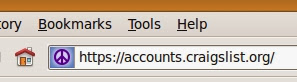
The legitimate Craigslist login page is:
https://accounts.craigslist.org
Scammers often use:
-
Misspelled domains
-
Additional words
-
Hyphenated URLs
-
Look-alike websites
Unexpected Account Alerts
Be cautious of emails claiming urgent account problems when you have not recently used Craigslist.
Requests for Immediate Action
Scammers often create pressure to prevent users from carefully reviewing the message.
Poor Grammar or Formatting
Many phishing emails contain spelling mistakes and unusual wording.
How to Protect Yourself
Access Craigslist Directly
The safest approach is to manually visit Craigslist rather than clicking links contained in emails.
Verify the URL
Always confirm you are on the official Craigslist website before entering credentials.
Use Strong Passwords
Avoid reusing passwords across multiple websites.
Enable Email Security
Use spam filters and remain cautious when opening unexpected messages.
What If You Entered Your Password?
If you entered your Craigslist credentials on a suspicious website:
-
Change your Craigslist password immediately.
-
Update any accounts using the same password.
-
Review recent Craigslist activity.
-
Monitor your email account.
-
Watch for unauthorized postings.
Quick action can help limit potential damage.
Related Resources
Looking for additional consumer resources?
Related Scam Warnings
Consumers researching Craigslist scams may also be interested in:
Have You Encountered a Craigslist Phishing Email?
Share your experience below.
-
What did the email claim?
-
Did it direct you to a login page?
-
Did the website appear legitimate?
-
Were you able to identify the scam?
-
Did you receive additional phishing messages afterward?
Your experience may help others recognize and avoid Craigslist account takeover scams.
When browsing rental listings, also review our rental application fraud guide before submitting fees or personal documents.
Disclaimer
ThinkItsAScam.com is an independent consumer information website. We are not affiliated with Craigslist. This article is intended for educational purposes only and to help consumers identify common phishing and account compromise scams.
Leave a Reply